
SaneCode vs Claude Sessions Pro
By  @inxanity06, founder of SaneCode · Updated
Short answer: On Windows, SaneCode is the better choice for most people. It keeps every Claude account in one window, side by side, free for 2 accounts with no time limit, and it helps when an account hits its usage limit: move the Code session to another account, or continue when the limit resets. Choose Claude Sessions Pro if you use a Mac or Linux, need Windows on ARM, or want a meter of every account’s usage.
Both solve the same problem: Claude desktop signs in one account at a time, and the  request for multiple accounts is still open. Both start the official Claude desktop app once per account, each with its own data folder, and neither changes Claude.
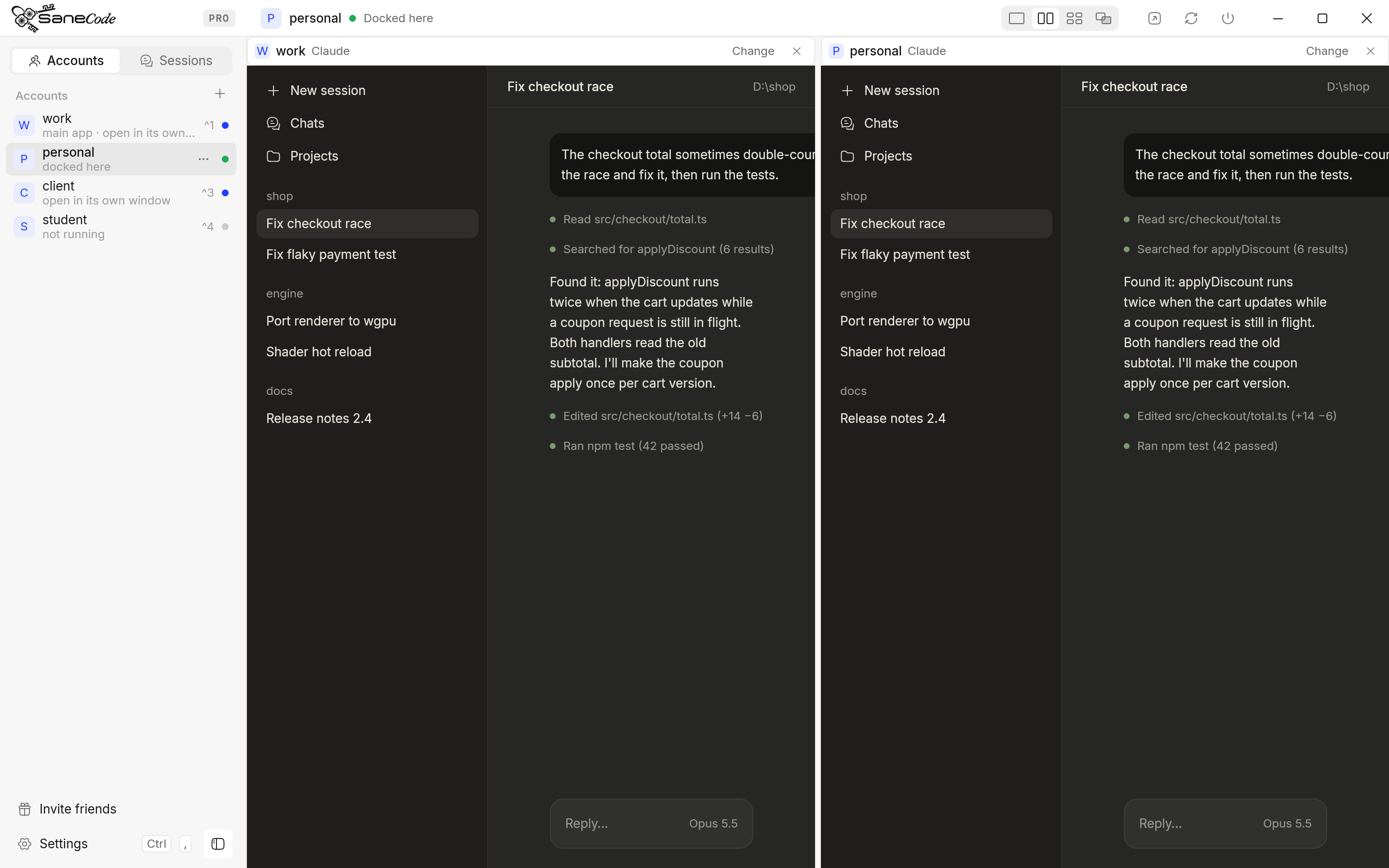
 Claude Sessions Pro gives each account its own window, or its own app on a Mac. SaneCode docks every account into one window with a sidebar, and pops any account out into its own window when you want one.
- Same engine: both run the official Claude desktop app per account. Usage limits stay each account’s own.
- Windows: SaneCode docks every account into one window (Split, Grid, Canvas) or pops it out. Claude Sessions Pro opens a separate window per account.
- Platforms: SaneCode is Windows only. Claude Sessions Pro runs on Mac, Windows (also ARM) and Linux.
- Free: SaneCode runs 2 accounts at once with no time limit. Claude Sessions Pro has a 1-hour preview.
- Price: SaneCode Pro is $29 once, on every PC. Claude Sessions Pro is $15 once for 2 computers.
- Usage limits: SaneCode moves a Code session to another account (Session Relay) and can continue after the reset. Claude Sessions Pro shows every account’s usage, with alerts.
How do SaneCode and Claude Sessions Pro compare?
The same official Claude underneath. The difference is where your accounts live, which computers it runs on, and what happens at a usage limit.
| SaneCode | Claude Sessions Pro | |
|---|---|---|
| What runs | The official Claude desktop app, one per account | The official Claude desktop app, one per account |
| Platforms | Windows 10/11, x64 | macOS 14+, Windows 10/11 (also ARM), Ubuntu 22.04+ and Debian 12+ |
| Windows | Docked in one window beside a sidebar, or any account popped out into its own window | Each account in its own window, titled “Claude — Work” (on a Mac, its own app with its own Dock icon) |
| Side by side | Split and Grid (Free), Canvas (Pro) | Arrange the windows yourself |
| Switching | Click an account, or Ctrl+1…9 | Tray or menu bar switcher, Alt-Tab or ⌘-Tab |
| Free | 2 accounts at the same time, side by side, no time limit | A 1-hour free preview |
| Paid | Pro $29 once: unlimited accounts, on every PC you sign in on | $15 once: unlimited accounts on 2 computers (3 more for $9.99), 14-day refund |
| Usage limits | Session Relay moves a Code session to another account (Free); Continue after reset and failover (Pro) | Session and weekly usage of every account in the tray, with alerts at 80% and 95% |
| Claude Code | The Code tab of each account’s Claude desktop | The Code tab per account, plus a terminal opened with that account’s own CLAUDE_CONFIG_DIR |
| MCP servers | One shared list for every account, or the accounts you pick | Set per account |
| Claude in Chrome | Every account uses Claude in Chrome in one Chrome profile (Pro) | Not covered |
| Signing in | A sign-in guide sends Claude’s sign-in link to the right account | Google sign-in comes back to the account that asked for it |
| Get it from | sanecode.co or the Microsoft Store | doubleclaude.com or the Microsoft Store |
| After a Claude update | Checks every account’s Claude folders and repairs them | Installs each new Claude version itself and updates every profile |
Claude Sessions Pro details from doubleclaude.com and its account switcher page, read November 26, 2026. SaneCode details from SaneCode Pro and the docs.
Which one should you choose?
On Windows, choose by how you work: one window with every account, or a window per account.
you’re on Windows and keep two or more Claude accounts open all day, and want them in one place, side by side, a click apart. You want to continue a Code session in another account when one hits its limit, one MCP list for every account, and Claude in Chrome for every account.
Get SaneCodeyou use a Mac or Linux, or Windows on ARM, want the same tool on every computer, or want a usage meter for every account with alerts before one runs out.
What are the pros and cons of each?
- + Every account docked in one window, with Split, Grid and Canvas, or popped out into its own
- + Free for 2 accounts at once, side by side, no time limit
- + Session Relay, Continue after reset and failover for usage limits
- + Shared MCP servers, sign-in guide, Claude in Chrome for every account
- + In the Microsoft Store, which installs and updates it
- − Windows x64 only
- − No usage meter in the sidebar
- + Mac, Windows (also ARM) and Linux, one licence
- + Every account’s usage in the tray, alerts at 80% and 95%
- + A terminal per account for Claude Code
- − Separate windows only, arranged by you; no docking or layouts
- − Free for 1 hour only
- − Nothing to carry on when an account hits its limit
More tools that do this are compared in Claude multi-account managers for Windows. Doing it by hand: how to use multiple Claude accounts on one computer. Other comparisons: SaneCode vs Claude Desktop Manager, SaneCode vs T3 Code.
SaneCode vs Claude Sessions Pro: questions
What is the difference between SaneCode and Claude Sessions Pro?
Both run the official Claude desktop app once per account, each with its own data folder, so every account stays signed in. SaneCode is for Windows and docks every account into one window with a sidebar and side-by-side layouts, or pops one out into its own window. Claude Sessions Pro runs on Mac, Windows and Linux and gives each account its own window (on a Mac, its own app).
Is there a free version?
SaneCode is free for 2 Claude accounts at the same time, with no time limit, including the Split and Grid layouts and Session Relay. Claude Sessions Pro has a free 1-hour preview, then costs $15.
How much do they cost?
SaneCode Pro is $29 once for unlimited accounts, on every PC you sign in on. Claude Sessions Pro is $15 once for unlimited accounts on 2 computers, plus $9.99 for 3 more.
Which one works on a Mac or Linux?
Claude Sessions Pro. SaneCode is Windows only for now.
Can I see two Claude accounts side by side?
In SaneCode, yes: Split and Grid put accounts next to each other in one window, and Canvas (Pro) holds any number. In Claude Sessions Pro each account is its own window, which you arrange yourself.
What happens when one account hits its usage limit?
SaneCode moves the Code session to another account with its history (Session Relay), and can type “Continue” or your own prompt when the limit resets. Claude Sessions Pro shows every account’s usage and warns you at 80% and 95%.
Do they change Claude or my usage limits?
No. Both start the official Claude desktop app, and each account keeps its own plan and usage limits.
How did we compare them?
We make SaneCode and use it every day on Windows 11 with Claude desktop 6.6395. Claude Sessions Pro’s side comes from its own home page and account switcher page, read on November 26, 2026; we quote its features and prices as published there. Prices and features change, so check its site before you buy. Claude Sessions Pro is made by LEX GLOBAL IT S.R.L.; neither it nor SaneCode is affiliated with Anthropic.