
Continue Claude or Codex after the limit resets.
The short answer: for one Claude Code session, tick Claude desktop’s Auto-continue when limits reset. To send your own prompt, continue a chat, nudge several accounts at once, or continue Codex (which has no continue after reset of its own), schedule a nudge in SaneCode’s Automations. It types “Continue” or your prompt into that window at the reset, even when the window isn’t in front, and logs it.
Windows 10 and 11. By @inxanity06, founder of SaneCode, who used a press-Enter script for months before building this. Updated 2026-11-17.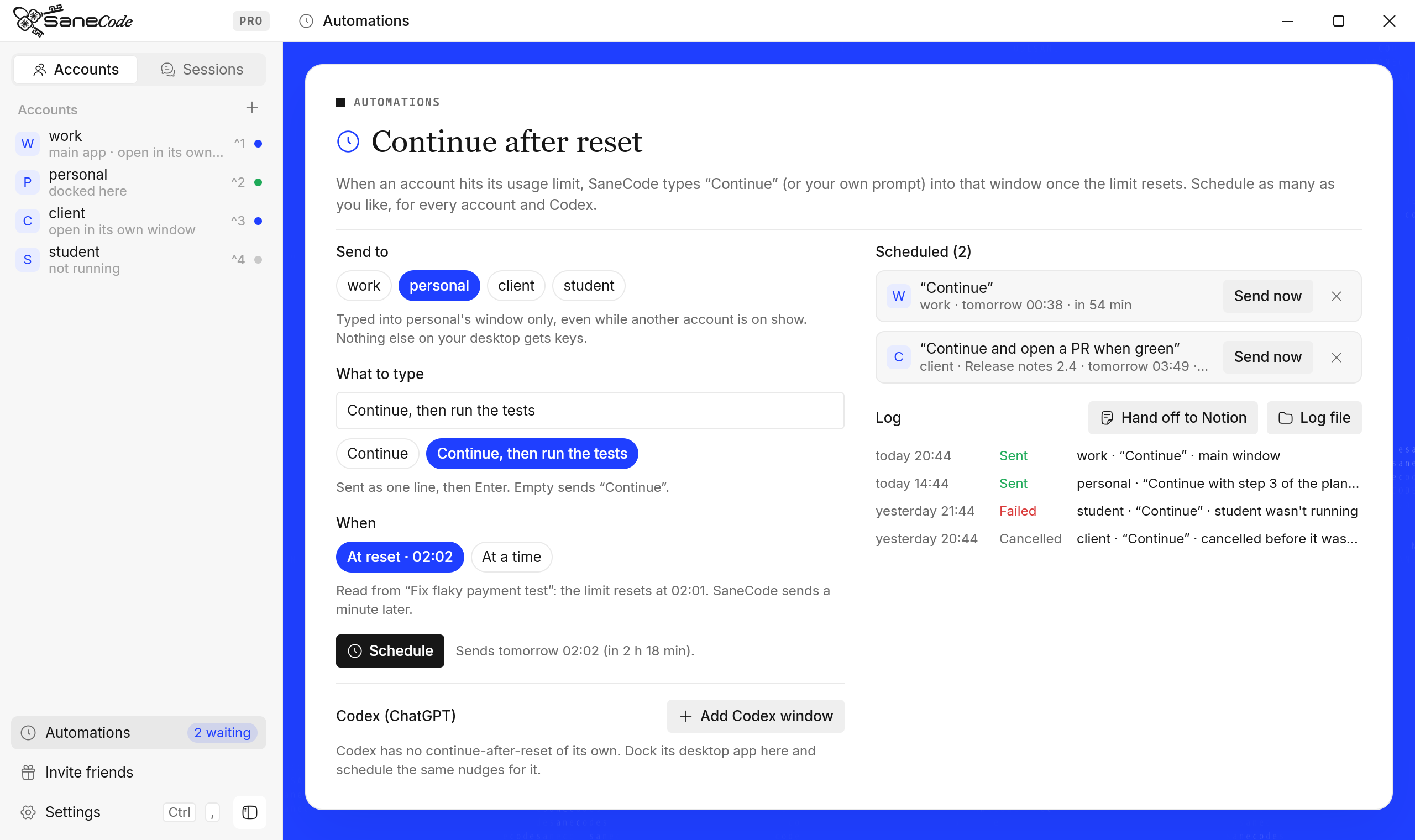
What should you know about continuing after a usage limit?
- Claude and Codex both stop at a usage limit and tell you when it resets (“Resets at 7:40 PM”, “try again at 21:28”).
- Claude desktop’s Code tab can retry the cut-off turn by itself (Anthropic, 2026 week 33). It can’t send a prompt you choose.
- Codex has no continue after reset. OpenAI documents buying or applying resets (OpenAI Help), not continuing automatically.
- Press-Enter scripts work only while the app is the window in front, and handle one window.
- SaneCode sends to one window directly, for any number of accounts and Codex, at the reset it reads from disk or a time you pick.
What does Claude’s “Auto-continue when limits reset” do?
In Claude desktop’s Code tab, the “5-hour limit reached” card has an Auto-continue when limits reset checkbox. Ticked, the card says when it will resume (“Auto-resuming at 7:41 PM”) and Claude retries the turn that was cut off once the limit resets.
- Built in and free; nothing to install
- Retries the same turn: you can’t send your own prompt
- Code sessions only, one session at a time; not chats, not Codex
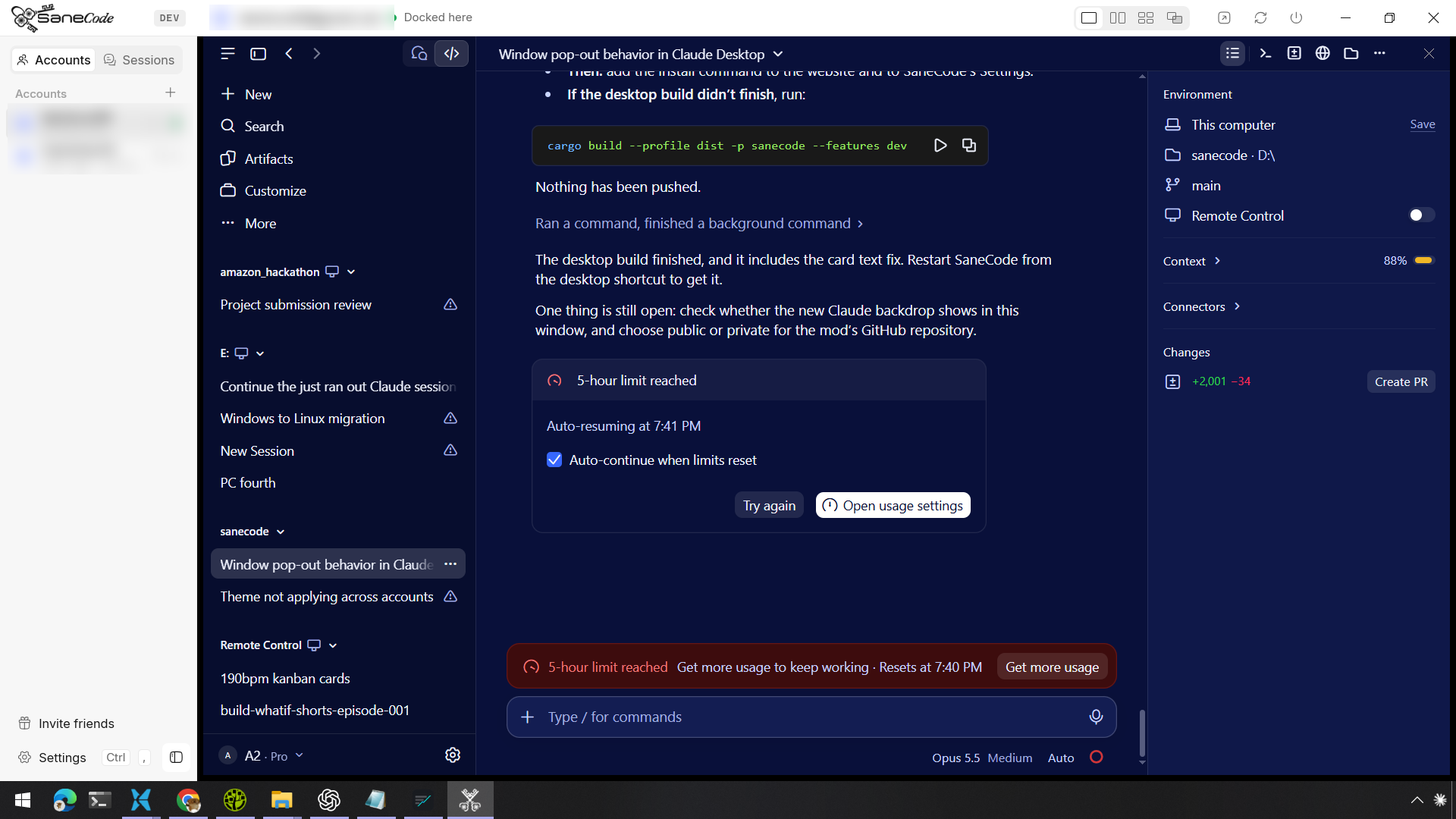
Claude desktop’s limit card with Auto-continue ticked (docked in SaneCode; account names blurred).
Why do press-Enter scripts break?
The common workaround is a small Python script: type “Continue” in the box, run the script with the reset time, and it presses Enter then. It presses Enter on the whole desktop, and Windows gives keys to the window in front. If a browser or another app is in front at 21:35, Enter goes there.
- The app must stay in front until the reset
- One script, one window: no nudges for several accounts
- No record of what was sent
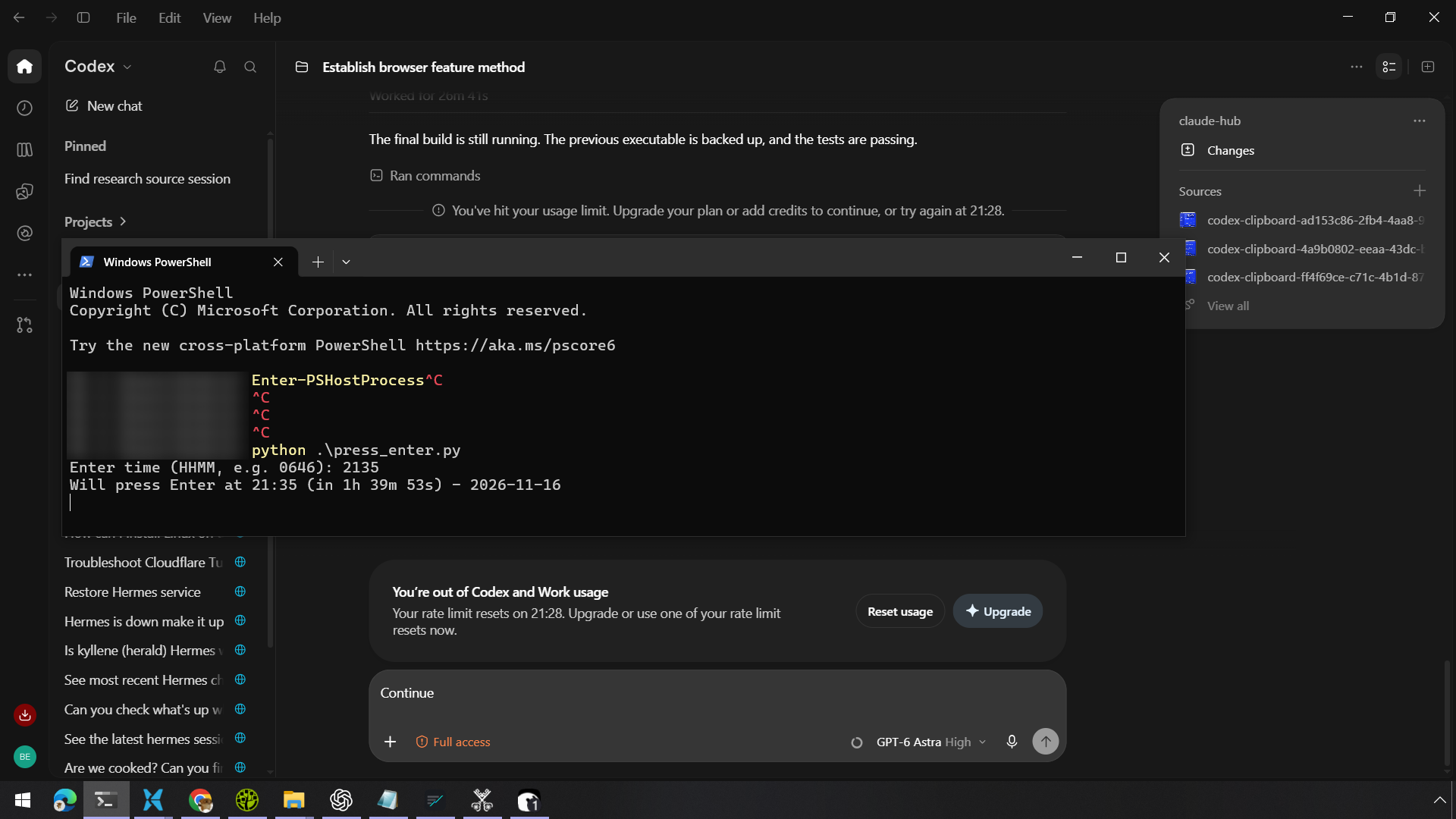
Codex at its usage limit, and a press_enter.py script waiting for 21:35. Codex has no continue after reset of its own.
How does SaneCode continue after the reset?
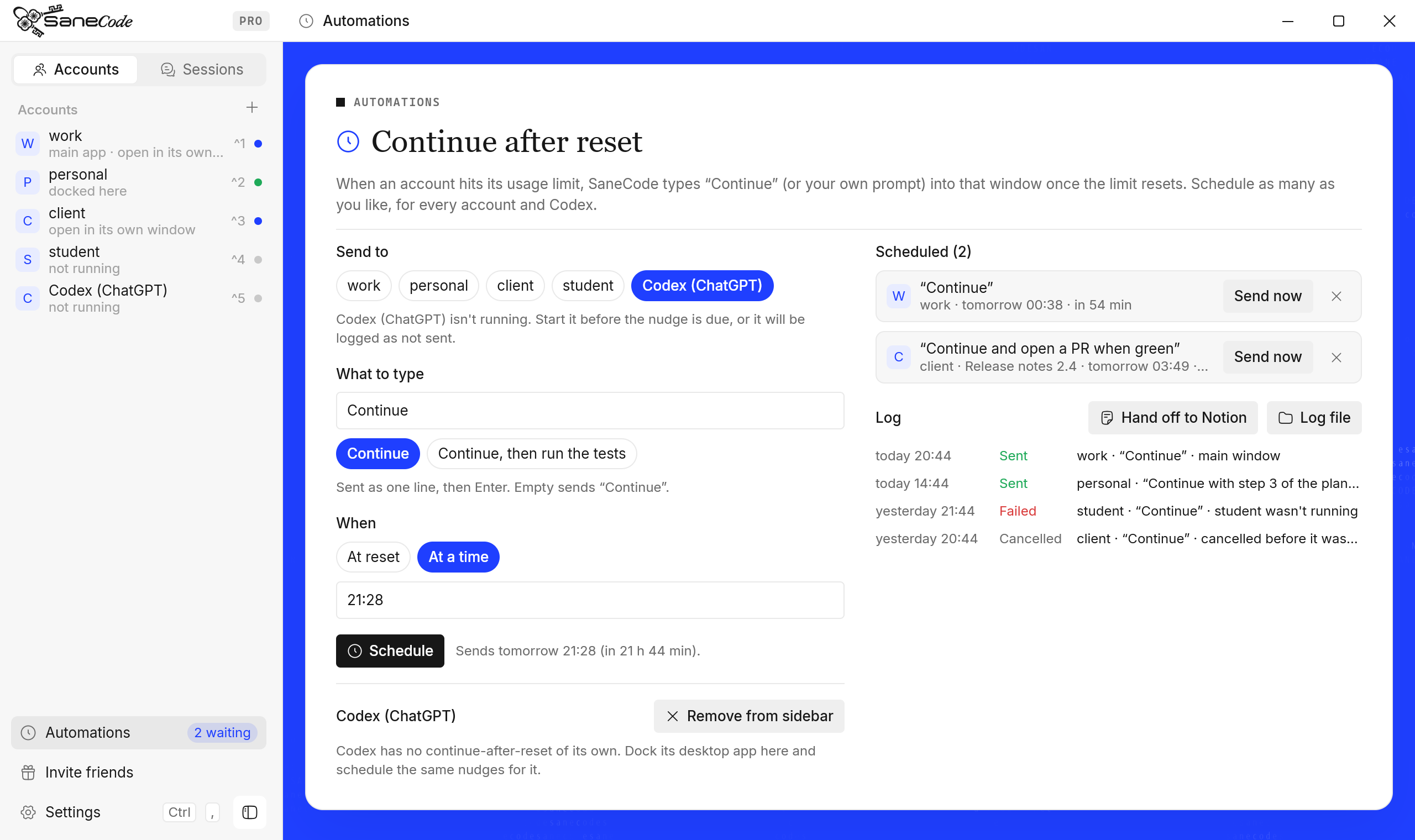
SaneCode runs the official Claude desktop for each of your accounts in one window, and can dock the Codex desktop app beside them. Automations schedules a nudge per window: at the reset time (read from the Code session or Codex’s own files) or a time you pick, it types “Continue” or your prompt into that window and presses Enter.
- Your own prompt, sent as the next message
- Any number of accounts, chats and Codex, each at its own time
- Sent to that window only; it can stay behind other windows
- Every nudge logged across restarts; Hand off to Notion
Which way to continue after a reset is best?
| Type it yourself | Claude Auto-continue | Press-Enter script | SaneCode Automations | |
|---|---|---|---|---|
| Your own prompt | Yes | No, retries the turn | Yes, typed beforehand | Yes |
| Claude chats (not Code) | Yes | No | Yes | Yes, you type the time |
| Codex (ChatGPT) | Yes | No; Codex has none | Yes | Yes |
| Window can be behind others | n/a | Yes | No, must be in front | Yes |
| Several accounts at once | One at a time | Each session on its own | One per script | Any number |
| Knows the reset time | You read it | Yes | You type it | Code and Codex: yes; chats: you type it |
| Log of what was sent | No | No | No | Yes, kept across restarts |
| Cost | Free | Free | Free | Free (up to 2 Claude accounts) |
Best for: Claude’s Auto-continue if you have one Claude Code session and the same turn should simply run again. Typing it yourself if you’ll be at your desk at the reset anyway. SaneCode if you want your own prompt, chats, several accounts, or Codex, without keeping a window in front. If you can’t wait at all, continue the conversation in another account right away.
About a minute once SaneCode is installed: open Automations, pick the account, keep “Continue” or type a prompt, press Schedule.
SaneCode must be running at that time; it sends once the PC wakes. The text goes where that window’s cursor is, so leave it in the chat box. One line, up to 2,000 characters. Windows only.
Install SaneCode, then read Continue after reset for every option, the log and Hand off to Notion.
Questions about continuing after a usage limit
How do I make Claude continue automatically after the usage limit resets?
In Claude desktop’s Code tab, tick “Auto-continue when limits reset” on the limit card: the app retries the interrupted turn after the reset. To send your own prompt instead, or to continue a chat, several accounts or Codex, schedule a nudge in SaneCode’s Automations page: it types “Continue” or your prompt into that window at the reset time.
Can Claude’s auto-continue send a custom prompt?
No. Claude’s Auto-continue retries the turn that was cut off with Claude Code’s own wording. SaneCode’s nudges type whatever you write, for example “Continue, then run the tests and open a PR”.
Does Codex continue automatically after its usage limit resets?
No. The Codex (ChatGPT) desktop app tells you when to try again (“try again at 21:28”) but has no setting to continue by itself. SaneCode docks the Codex app and sends “Continue” or your prompt to it at that time.
Why does my Python press-Enter script only work with the window in front?
Scripts like pyautogui or SendInput press keys on the whole desktop, and Windows gives keys to the window in front. If anything else is in front at that moment, Enter lands there. SaneCode sends the text to one window directly, so it can stay behind other windows.
Can I schedule continue for several Claude accounts at once?
Yes. SaneCode schedules any number of nudges, each for its own account (or popped-out chat, or Codex) and its own time, and logs every one.
Does SaneCode know when my limit resets?
For Claude Code sessions and Codex, usually yes: it reads the reset time Claude Code and Codex write in their session files on your PC. Chats in the Claude app keep nothing locally, so you type the time Claude shows.
Does it work if my PC goes to sleep?
SaneCode must be running. If the PC was asleep at the time, SaneCode sends as soon as it wakes. It doesn’t wake the PC itself.
Is it free?
Yes, Automations is in SaneCode’s free version (up to 2 Claude accounts, plus Codex). Claude and Codex usage is billed by Anthropic and OpenAI as usual.
Sources: Claude Code what’s new, 2026 week 33 · OpenAI Help: Codex rate limit resets · Claude Code issue #35744: auto-continue after reset. Screenshots: the founder’s own, November 16, 2026.