
Continue a Claude conversation in another account (Session Relay)
Session Relay is SaneCode’s name for moving a Claude Code conversation from one of your Claude accounts to another, so you can keep working when the first one hits its usage limit. It’s part of SaneCode Pro.
You’re deep into a task in Claude Code and Claude says you’ve reached your usage limit. Without SaneCode you’d wait for the limit to reset, or start a new chat in another account and explain the whole task again: what you’re building, which files matter, what’s already been decided.
With SaneCode you move the conversation itself to another of your Claude accounts and carry on from the last message. Claude sees the full history, the same project folder and everything it already worked out.
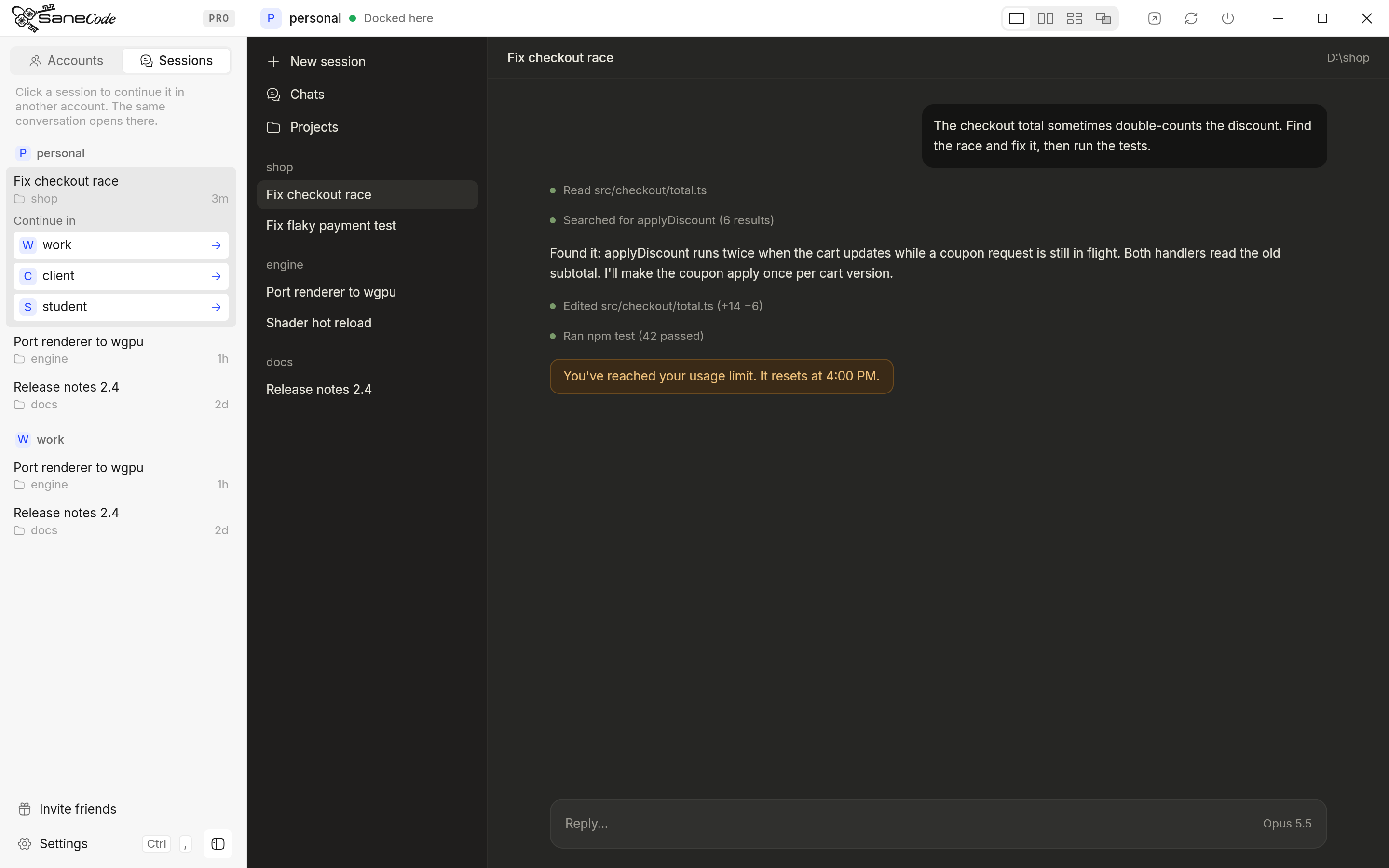
Step by step
- Open the Sessions tab in the sidebar. It lists every account’s Claude Code conversations, grouped by account (the account on show first), newest first, with their project folder and when you last used them. A conversation you start while the tab is open shows up within a second or so.
- Click the conversation. Continue in lists your other accounts.
- Pick an account that still has room. SaneCode switches to it, and the conversation is in its Code tab, ready to continue.
If that account’s Claude was already open, SaneCode asks for one click on Restart first: Claude reads its list of conversations when it starts.
What comes along
- Every message so far, Claude’s earlier answers and tool results.
- The project folder and the session’s settings (model, permission mode).
- Not the first account’s connectors: the conversation now uses the connectors of the account it’s in.
How it works (and why nothing leaves your PC)
Claude desktop keeps each Claude Code conversation in your Windows user folder, and every account on the PC uses that same folder. What’s separate per account is only the list of conversations. SaneCode adds the conversation to the other account’s list. Nothing is uploaded, and the original stays where it was.
Good to know
- The account you continue in must have opened the Code tab at least once.
- This works for Claude Code conversations (the desktop Code tab). Regular claude.ai chats live on Anthropic’s servers per account and can’t be moved this way.
- Coming next: SaneCode will notice the limit message itself and offer Continue in… right then (roadmap).
Related: Switching accounts · Adding accounts · Why SaneCode runs Claude natively
Written by the founder, @inxanity06 · Updated 2026-11-16