
SaneCode vs Claude Desktop Manager
By  @inxanity06, founder of SaneCode · Updated
Short answer: SaneCode is the better choice for most people. Choose it to work in two Claude accounts at the same time, side by side, for free and with no time limit. On Claude Desktop Manager’s free tier one Claude runs at a time: to use the other account you close one and open the other, so you keep switching instead of working with both. Choose SaneCode for every account in one window or popped out into its own. Choose Claude Desktop Manager for a hotkey per account, ARM64, or sending one question to several accounts.
Both solve the same problem: Claude desktop signs in one account at a time, and the  request for multiple accounts is still open. Both start the official Claude desktop app once per account, each with its own data folder, and neither changes Claude.
 Claude Desktop Manager keeps each profile in a separate window. SaneCode docks every account into one window with a sidebar, and pops any account out into its own window when you want one.
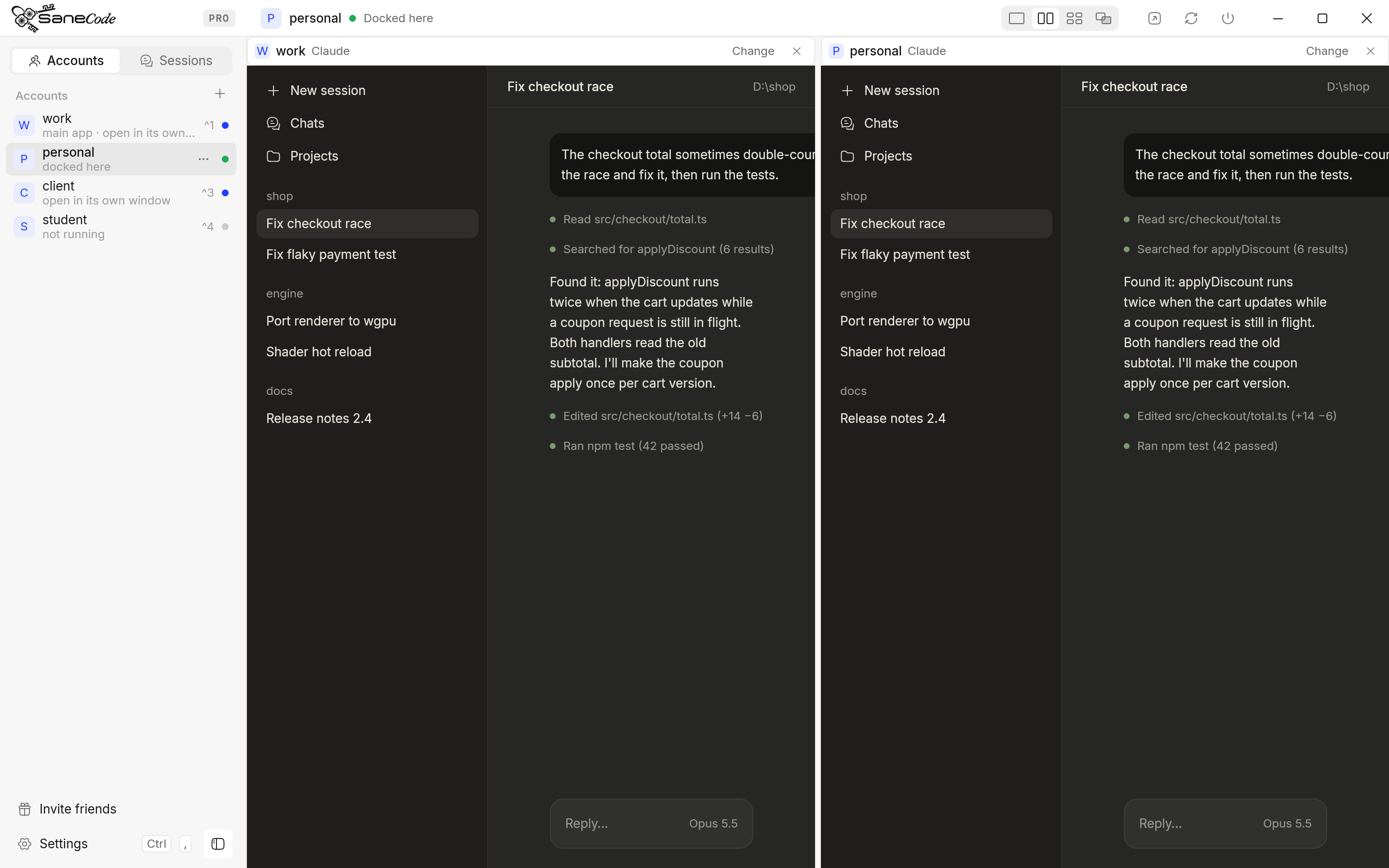
- Same engine: both run the official Claude desktop app per account. Usage limits stay each account’s own.
- Windows: SaneCode docks every account into one window (Split, Grid, Canvas) or pops it out into its own window. Claude Desktop Manager only opens one window per profile.
- Free tier: SaneCode runs 2 accounts at once, side by side, with no time limit. Claude Desktop Manager runs one at a time; 2 or more together stop after 15 minutes, so you close one Claude to work in the other.
- Price: SaneCode Pro is $29 once for unlimited accounts. Claude Desktop Manager is $10 once for 2 and $30 once for unlimited.
- Usage limits: SaneCode moves a Code session to another account (Session Relay) and can send “Continue” when the limit resets.
How do SaneCode and Claude Desktop Manager compare?
The same official Claude underneath. The difference is everything around it: windows, switching, and what happens at a usage limit.
| SaneCode | Claude Desktop Manager | |
|---|---|---|
| What runs | The official Claude desktop app, one per account | The official Claude desktop app, one per profile |
| Windows | Docked in one window beside a sidebar, or any account popped out into its own window | One Claude window per profile, titled “Claude - ProfileName” |
| Side by side | Split and Grid (Free), Canvas (Pro) | Arrange the windows yourself; it remembers where each one was |
| Switching | Click an account, or Ctrl+1…9 | Global switcher (Ctrl+`) and a hotkey per profile |
| Free | 2 accounts running at the same time, side by side, no time limit | Unlimited profiles, but 1 running at a time; 2 or more together for 15 minutes, then close one to use the other |
| Paid | Pro $29 once: unlimited accounts, Canvas, Continue after reset, Claude in Chrome for every account, settings sync | Standard $10 once (2 at a time), Pro $30 once (unlimited, QuickAsk, QuickPrompt, backup) |
| After a usage limit | Session Relay moves the Code session to another account; Continue after reset sends “Continue” when the limit resets | Not covered |
| MCP servers | One shared list for every account, or the accounts you pick | One list per profile; copy from the default profile |
| Claude Code | The Code tab of each account’s Claude desktop | A terminal per profile, a Sessions board, completion notifications |
| Signing in | A sign-in guide sends Claude’s sign-in link to the right account | Sign in once per profile |
| Platforms | Windows 10/11, x64 | Windows 10/11, x64 and ARM64; English, French, Spanish, German |
| Get it from | sanecode.co or the Microsoft Store (updates through the Store) | An installer from its site (SmartScreen may warn) |
| After a Claude update | Checks every account’s Claude folders and repairs them | Restart each profile |
Claude Desktop Manager details from claudeprofiles.com and its guide, read November 18, 2026. SaneCode details from SaneCode Pro and the docs.
Which one should you choose?
Both give you a window per account. SaneCode also docks them together; Claude Desktop Manager adds hotkeys and ARM64.
you keep two or more Claude accounts open all day and want them in one place, side by side, a click apart, with any account popped out into its own window when you need it. You want to continue a Code session in another account when one hits its limit, and one MCP list for every account.
Get SaneCodeyou want a hotkey per account, a tray app that starts profiles with Windows, need ARM64, or want to send one question to several accounts at once (QuickAsk, Pro).
What are the pros and cons of each?
- + Every account docked in one window, with Split, Grid and Canvas, or popped out into its own
- + Free for 2 accounts at once, side by side, no time limit: work in both, no closing and reopening
- + Session Relay and Continue after reset for usage limits
- + Shared MCP servers, sign-in guide, Claude in Chrome for every account
- + In the
 Microsoft Store, which installs and updates it
- − Windows x64 only
- − English only
- + A hotkey per profile and a global switcher
- + ARM64 build; four languages
- + Crash restart, start with Windows, a Sessions board for Claude Code
- − Separate windows only, arranged by you; no docking or layouts
- − Free tier: one Claude at a time (2 or more for 15 minutes), so you close one to open the other
- − Updates by uninstalling and reinstalling
More tools that do this, from GitHub scripts to Claude Sessions Pro, are compared in Claude multi-account managers for Windows. Doing it by hand: switch between Claude accounts without logging out. Another comparison: SaneCode vs T3 Code.
SaneCode vs Claude Desktop Manager: questions
What is the difference between SaneCode and Claude Desktop Manager?
Both run the official Claude desktop app once per account on Windows, each with its own data folder. SaneCode docks every account into one window with a sidebar and side-by-side layouts, and pops any account out into its own window when you want one. Claude Desktop Manager opens each profile as its own Claude window and adds hotkeys, a tray icon and crash restart.
Which one is free?
SaneCode is free for 2 Claude accounts running at the same time, with no time limit, plus the Split and Grid layouts and Session Relay. Claude Desktop Manager is free for unlimited profiles but runs one at a time; two or more together are capped at 15 minutes, so on Free you close one Claude to work in another. Its Standard tier ($10 once) runs 2 at a time.
How much do they cost?
SaneCode Pro is $29 once for unlimited accounts. Claude Desktop Manager is $10 once for 2 at the same time and $30 once for unlimited.
Do they change Claude or my usage limits?
No. Both start the official Claude desktop app, and each account keeps its own plan and usage limits.
Does either work on ARM64 Windows?
Claude Desktop Manager has an ARM64 build. SaneCode is x64 only for now.
Can I continue a conversation in another account when I hit a limit?
In SaneCode, yes: Session Relay moves a Claude Code session to another account with its history. Claude Desktop Manager doesn’t say it does this.
How did we compare them?
We make SaneCode and use it every day. Claude Desktop Manager’s side comes from its own home page and guide, read on November 18, 2026; we quote its features and prices as published there, and we tested it ourselves. Prices and features change, so check its site before you buy. Claude Desktop Manager is an independent tool; neither it nor SaneCode is affiliated with Anthropic.