
On this page
- Key takeaways
- What does a Claude multi-account manager do?
- Which Claude multi-account managers work on Windows? (Comparison)
- SaneCode: every account in one window, or each in its own
- Claude Desktop Manager (claudeprofiles.com)
- Claude Sessions Pro (doubleclaude.com)
- Multi Instance for Claude Desktop (Microsoft Store)
- Free GitHub scripts (Claude profiles on GitHub)
- Is it allowed to have multiple Claude accounts?
- Which one should you choose?
- FAQ
- How did we compare them?
- The bottom line
By  @inxanity06, founder of SaneCode · Updated
Claude multi-account managers for Windows, compared
Short answer: Claude Desktop signs in one account at a time, so a “Claude multi-account
manager” starts one copy of the official Claude app per account, each with its own data folder.
On Windows you can pick from SaneCode (every account docked in one window or popped out into its own, free for 2),
 Claude Desktop Manager (one window per profile, $10 for 2 at once),
 Claude Sessions Pro (one window per account, $15) and free GitHub
scripts that start a second Claude with
--user-data-dir. SaneCode is the best of them: it’s
the only one that runs two accounts side by side for free with no time limit, docks them in one
window, and moves a conversation to another account when one hits its usage limit.
People search for this under a lot of names: Claude account switcher, Claude profiles, Claude
Desktop manager, Claude Desktop multiple instances, two Claude accounts on the same computer. They
all mean the same thing. You have a work account and a personal one, or two Max plans, and you’re
tired of logging out of one to use the other. The
 GitHub request for multiple accounts in Claude Desktop
is still open, so third-party tools fill the gap.
This guide compares them as of November 18, 2026, from each tool’s own site.
Key takeaways
- Every tool here runs the official Claude Desktop app once per account. None of them changes Claude, and each account keeps its own plan and usage limits.
- The big difference is windows. SaneCode docks every account into one window with a sidebar and side-by-side layouts, and pops any account out into its own window when you want one. Claude Desktop Manager, Claude Sessions Pro and the scripts only open a separate Claude window per account.
- Free tiers differ. SaneCode runs 2 accounts at once for free, side by side, with no time limit. Claude Desktop Manager’s free tier runs one at a time (two together for 15 minutes), so you close one Claude and open the other every time you switch.
- GitHub scripts cost nothing but need PowerShell and break when a Claude update moves things.
- Owning several Claude accounts is allowed. Sharing one account between people, or making accounts just to get around usage limits, is not.
What does a Claude multi-account manager do?
It starts a separate copy of Claude Desktop for each account and keeps each one’s sign-in apart.
Claude Desktop is an Electron app. Electron keeps a sign-in, settings and local state in one
data folder, and lets only one copy run per data folder. Start Claude with a different folder
(--user-data-dir) and you get a second, independent Claude that stays signed in to a different
account. Every manager on this page is built on that. They differ in everything around it: how
you start the copies, where the windows go, and what they add on top.
We explain how SaneCode does it, without changing the official app, in how SaneCode runs multiple Claude instances.
Which Claude multi-account managers work on Windows? (Comparison)
| SaneCode | Claude Desktop Manager | Claude Sessions Pro | Multi Instance for Claude Desktop | GitHub scripts | |
|---|---|---|---|---|---|
| Windows | Docked in one window beside a sidebar, or any account in its own window | One window per profile | One window per account | One window per instance | One window per copy |
| Side by side | Split, Grid, Canvas layouts | Arrange the windows yourself | Arrange the windows yourself | Arrange the windows yourself | Arrange the windows yourself |
| Free | 2 accounts at once, side by side, no time limit | Unlimited profiles, 1 running at a time (2+ for 15 minutes) | 14-day refund | No | Yes |
| Paid | Pro $29 once: unlimited accounts | $10 once for 2 at once, $30 for unlimited | $15 once (2 PCs) | $9.49 once (Microsoft Store) | Free |
| Platforms | Windows 10/11 x64 | Windows 10/11 x64 and ARM64 | Windows, macOS, Linux | Windows | Windows (some macOS) |
| Get it from | sanecode.co or the Microsoft Store | Installer from its site | Its site | Microsoft Store | GitHub |
| Continue a session in another account | Yes (Session Relay) | No | No | No | No |
| MCP servers | One shared list for every account | One list per profile, copy from default | Per account | Per instance | By hand |
Sources: SaneCode Pro, claudeprofiles.com and its
guide, doubleclaude.com,
the developer’s GitHub post about Multi Instance for Claude Desktop.
SaneCode: every account in one window, or each in its own
Best for: people who keep two or more Claude accounts open all day and want them in one place.
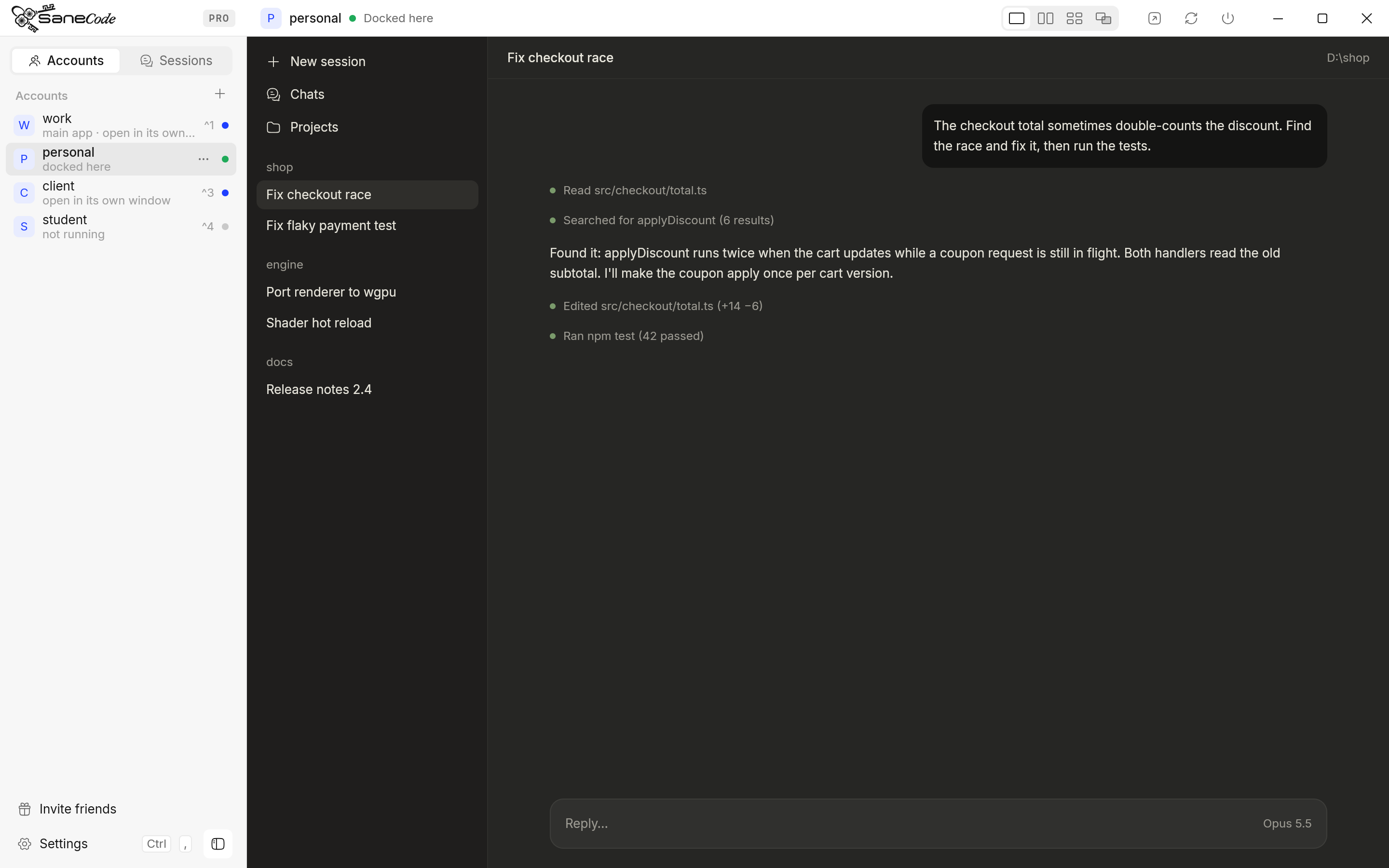
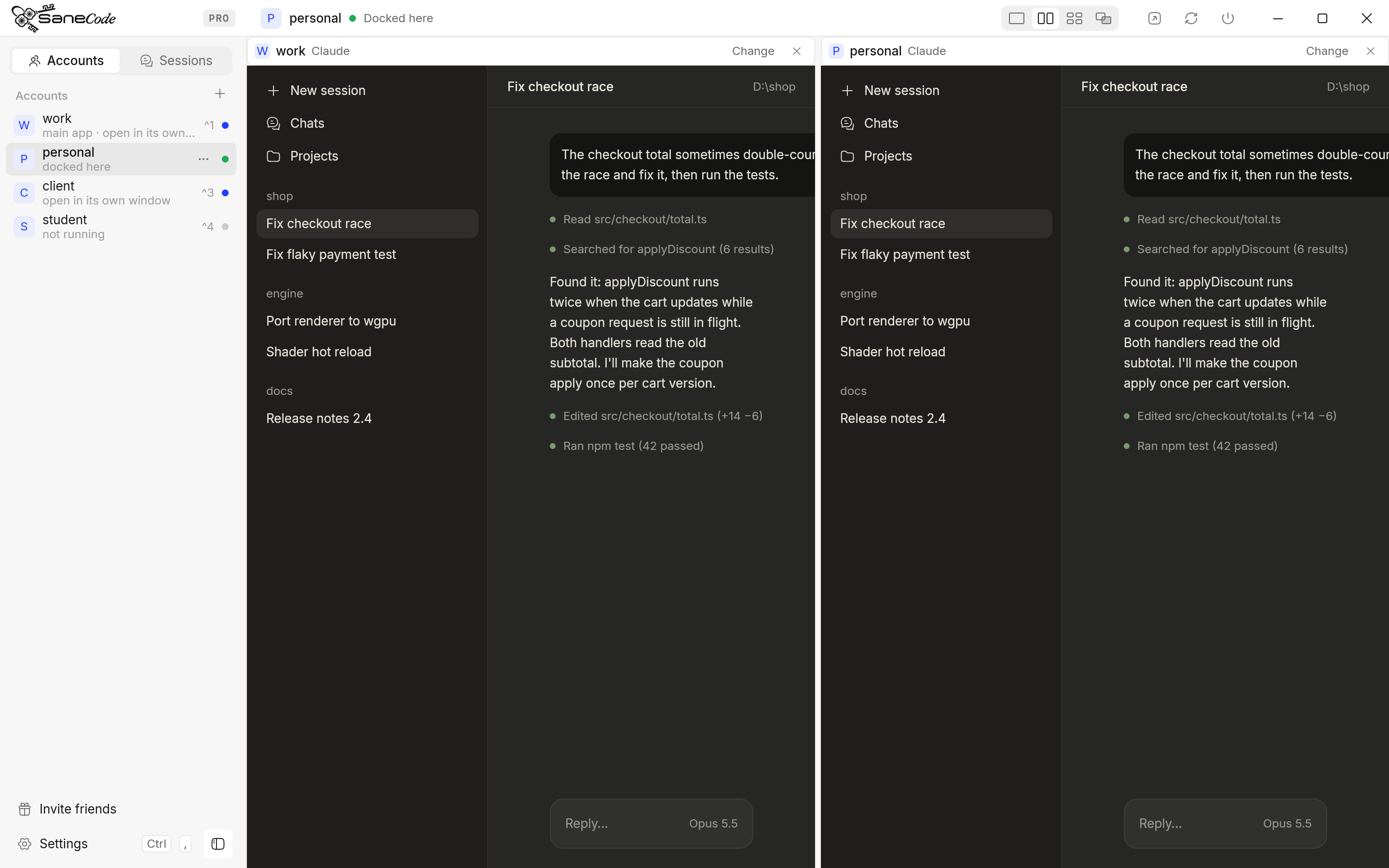
SaneCode runs the official Claude Desktop once per account and docks the windows into its own window. The accounts sit in a sidebar; click one, or press Ctrl+1, Ctrl+2, to switch. Want an account in its own window instead? Pop out puts it on the desktop as a separate Claude window, still listed in the sidebar; pick it again to bring it back (accounts and windows). Either way, switching is one click. You can put two accounts side by side (Split), tile more (Grid), or place them freely (Canvas, Pro).
What it adds:
- Session Relay: when one account hits its usage limit, move the Claude Code session to another account and keep the conversation.
- Shared MCP servers: add an MCP server once for every account, or only the ones you pick.
- Continue after reset (Pro): types “Continue” into the right window when a limit resets, for Claude and Codex.
- A sign-in guide. Claude’s sign-in links always open the main Claude; SaneCode routes them to the right account (how adding an account works).
- Claude in Chrome for every account (Pro) and themes.
Price: free for 2 accounts with Split and Grid. Pro is $29 once for unlimited accounts and the rest.
Where to get it: sanecode.co or the
 Microsoft Store, where Pro is bought with your Microsoft account.
The catch: Windows only, x64 only. Disclosure: SaneCode is our app.
Claude Desktop Manager (claudeprofiles.com)
Best for: people who want each account in its own window, with hotkeys.
Claude Desktop Manager gives each profile its own data folder
and opens it as its own Claude window, titled with the profile’s name. A global switcher
(Ctrl+`) and per-profile hotkeys bring a profile to the front or start it. It lives in the
system tray, can start profiles with Windows and restarts a profile’s Claude if it crashes. For
Claude Code it has a terminal per profile and a Sessions board (Working, Needs you, Done,
Stalled). Its Pro tier adds QuickAsk, which sends one question to several profiles at once, and a
daily backup of Claude Code sessions (guide).
Price: free for unlimited profiles, but one runs at a time; two or more together are capped at 15 minutes. So on Free you can’t keep two accounts side by side and work in both: you close one and open the other each time. Standard is $10 once for 2 at the same time; Pro is $30 once for unlimited.
The catch: every account is a separate window you arrange yourself. MCP servers are set per profile; profiles “don’t share MCP config automatically”. Updating means uninstalling the old version and installing the new one. We compare it with SaneCode in detail on SaneCode vs Claude Desktop Manager.
Claude Sessions Pro (doubleclaude.com)
Best for: people on Mac and Windows (and Linux) who want the same tool everywhere.
Claude Sessions Pro runs Claude once per account. On Windows each
account opens in its own Claude window labelled with the account name; on a Mac each account is
its own app with its own Dock icon. A tray switcher changes accounts, and a usage meter shows each
account’s session and weekly limits with alerts at 80% and 95%.
Price: $15 once for 2 computers, 14-day refund.
The catch: separate windows, no layouts.
Multi Instance for Claude Desktop (Microsoft Store)
Best for: people who want other AI engines next to Claude.
Its developer announced it on GitHub in
June 2026. It runs isolated Claude Desktop instances side by side, and since September 2026 an
instance can run on another engine (Kimi, GLM, DeepSeek, OpenAI and others) instead of an Anthropic
account. It costs $9.49 once on the Microsoft Store.
Free GitHub scripts (Claude profiles on GitHub)
Best for: two accounts, nothing to install, and you’re fine with PowerShell.
Search GitHub for “Claude profiles” and you find dozens of scripts. On Windows they come in two kinds:
- Start a second Claude with its own folder. For example
dual-claude-launcher starts two Claude Desktop
windows, each with its own profile folder. Both stay signed in. We show the one-line PowerShell
version in how to switch between Claude accounts.
- Swap the sign-in and restart Claude. Tools like
claude-account-switcher save each
account’s profile and restart Claude with another one. Only one account runs at a time.
Most “Claude account switcher” repos on GitHub are for Claude Code in the terminal, not the
desktop app. They give each account its own CLAUDE_CONFIG_DIR; see
Claude Code with multiple accounts.
The catch: a second copy started by a script gets Claude’s sign-in link sent to the first
copy, so signing in takes a workaround. Claude in Chrome pairing is off in the second copy
(@matautu). And a Claude update can move the
app, which breaks hard-coded paths.
Is it allowed to have multiple Claude accounts?
Yes, owning several accounts is allowed. An Anthropic Claude Code team member said “It’s not against
terms of service to have multiple MAX accounts”
( PiunikaWeb).
What Anthropic’s Consumer Terms don’t allow is
sharing your login with other people. The Claude Desktop Manager site adds that its tool doesn’t
change usage limits: each account “keeps its own subscription and usage limits”
(claudeprofiles.com). The same is true of SaneCode, which runs the
official app and never touches a login. More on the rules, including for proxies, in
Claude Code with multiple accounts.
Which one should you choose?
For most people, SaneCode. It does what the others do and more, and it’s free for two accounts. The others fit narrower needs:
- Two accounts, used all day, in one window or each in its own: SaneCode, free.
- Hotkeys per account, ARM64, or one question sent to several accounts: Claude Desktop Manager.
- The same tool on Mac and Windows: Claude Sessions Pro.
- Claude plus other AI engines: Multi Instance for Claude Desktop.
- Nothing to install, and you know PowerShell: a GitHub script.
- Only Claude Code in the terminal:
CLAUDE_CONFIG_DIR, no app needed. - A work and a personal account: see personal and work Claude accounts.
FAQ
Can I run two Claude Desktop apps at the same time?
Yes. The easiest way is SaneCode: add your second account, sign in once, and both Claude
Desktop apps run at the same time, side by side in one window, free for two accounts. Under the
hood each account gets its own data folder; a script can do the same with --user-data-dir.
Can I have two Claude accounts on the same computer?
Yes. Each account needs its own Claude data folder (or a browser profile on claude.ai). One Claude Desktop app holds one account at a time.
Does Claude Desktop have profiles?
No. Claude Desktop has no profiles for accounts on different emails. Accounts on the same
email (a personal plan and a Team seat) can switch from the account menu
( Claude Help Center).
Does running several accounts use up limits faster?
No. Each account is its own plan with its own limits, and the official app counts usage the same way inside any of these tools.
Do these tools need my Claude password?
They shouldn’t. Claude has no passwords: you sign in in the real Claude app with an email link or Google. SaneCode never sees or copies a login.
How did we compare them?
We read each tool’s own site and guide on November 18, 2026, and quote their prices and features as published there. We tested SaneCode and each of the others ourselves. Prices and features change; check each tool’s site before you buy.
The bottom line
SaneCode is the best Claude multi-account manager for Windows. Every tool here runs the same official Claude, one data folder per account; SaneCode is the one built around working in several accounts at once. What you get:
- Every account signed in at once, free for two with no time limit; Pro for unlimited.
- One window or many: accounts docked beside a sidebar, or any account popped out into its own window. Switch with a click or Ctrl+1…9.
- Side by side: Split and Grid on Free, Canvas on Pro.
- Session Relay: continue a Claude Code conversation in another account when one hits its usage limit.
- Continue after reset (Pro): sends “Continue” (or your prompt) to Claude or Codex when the limit resets.
- Shared MCP servers for every account, or the ones you pick.
- Claude in Chrome for every account in one Chrome profile (Pro).
- Settings sync (Pro): your setup follows you to every PC.
- A sign-in guide that sends Claude’s sign-in link to the right account.
- Themes for Claude desktop and Claude Code.
- Repair after Claude updates: checks every account’s folders when Claude updates.
- Codex docked beside your Claude accounts.
- From sanecode.co or the Microsoft Store.
Try SaneCode free with your first two accounts.
SaneCode runs the official Claude desktop once per account. Free for 2 accounts.
 Claude Code with multiple accounts: CLAUDE_CONFIG_DIR, CLIProxyAPI and switchers explainedHow to use two or more Claude accounts in Claude Code without /logout: one config folder per account with CLAUDE_CONFIG_DIR (Anthropic's documented way), PowerShell and bash setups, CLIProxyAPI for pooling, rotators like cswap, and what Anthropic's terms say.How to use a personal and a work Claude account on one computer (2026)Keep your personal and work Claude accounts apart without logging out: the same-email switcher, browser profiles, a second Claude desktop, CLAUDE_CONFIG_DIR and SaneCode, compared. Plus what Anthropic says about training, connectors and moving accounts.
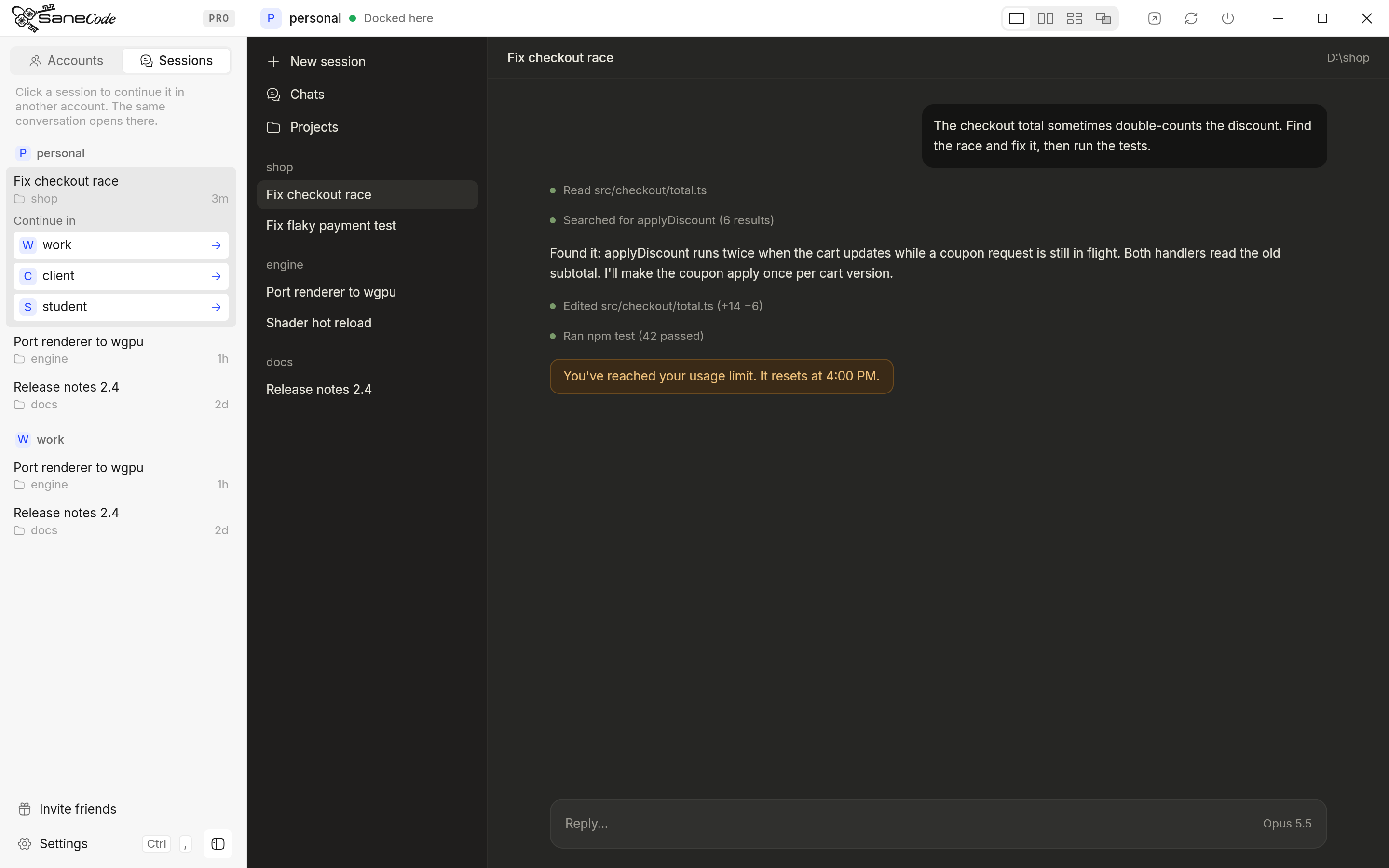 Hit your Claude usage limit? How to continue the same conversation in another accountWhen Claude says you've reached your usage limit mid-task, you can wait, or carry the same Claude Code conversation into your other account with full context. Step-by-step for the CLI (claude --resume), the desktop Code tab, auto-switchers, and what's allowed.