
On this page
- Key takeaways
- What actually happens when you hit the limit?
- Can you move a conversation to another Claude account?
- Method 1: Terminal, same config folder: /login then --continue
- Method 2: Terminal, separate accounts: resume by path
- Method 3: Let a tool switch for you
- Method 4: The desktop app’s Code tab
- Session Relay: continue in another account with SaneCode
- Is it against the terms to switch accounts when you hit the limit?
- How did we research this?
- FAQ
- The bottom line
By  @inxanity06, founder of SaneCode · Updated
Hit your Claude usage limit? Continue the same conversation in another account
Short answer: You can’t raise the limit, but you can carry the same Claude Code conversation
into another of your Claude accounts with its full history. In the terminal, resume it from the
other account with claude --resume. In the Claude desktop app, SaneCode’s
Session Relay moves it to the account you pick. Or wait, and have it
continue by itself when the limit resets.
You’re two hours into a refactor. Claude knows the codebase, the plan, the three things you already tried. Then: “You’ve reached your usage limit.” The reset is hours away.
You have a second account. But a new chat there knows nothing, and explaining everything again
eats the very limit you just got back. A GitHub issue describes it exactly: hitting the limit
“completely disrupts the workflow… forcing users to either wait for the limit to reset or abandon
the session entirely”
( #64376).
Plenty of people live with this. One user on X:
“i currently have 7 claude max plans because i use claude really heavily and when one account hits the quota i just switch to another one” (
Here’s how to make that switch without losing the conversation.
Key takeaways
- Regular claude.ai chats can’t move between accounts. They live on Anthropic’s servers, per account.
- Claude Code conversations can. They’re saved as files on your computer, so another account can pick up the same conversation.
- In the terminal: sign in to the other account and run
claude --continue, or resume the exact transcript withclaude --resume <path-to-.jsonl>. - In the desktop Code tab: each account lists only its own sessions, so the conversation seems to vanish. SaneCode’s Session Relay moves it for you.
- Owning two accounts is fine. Sharing them is not. Details below.
What actually happens when you hit the limit?
“Pro and Max plans have a five-hour session limit and a weekly limit”, and “these limits are shared
across Claude and Claude Code”
( Using Claude Code with your Pro or Max plan).
So a busy chat day can stop your coding session too.
When you hit one, you have three choices:
- Wait. The desktop app’s Code tab can retry for you: it has an Auto-continue when limits
reset option (
 what’s new, week 33).
- Start fresh in another account. Fast, but you lose all the context.
- Carry the conversation over to another account. That’s what this guide is about.
Can you move a conversation to another Claude account?
It depends where the conversation lives.
Chats on claude.ai, the desktop app’s Chat tab and mobile: no. Anthropic’s support assistant,
quoted on Reddit, says “Chats, projects, and conversations can’t be transferred or continued between
the accounts”
( r/Anthropic).
The best you can do is ask Claude for a handoff summary before the limit hits and paste it into the
other account.
Claude Code: yes. Claude Code saves each conversation as a .jsonl transcript in your
user folder, under ~/.claude/projects (Windows: %USERPROFILE%\.claude\projects), one folder per
project. The transcript isn’t locked to an account. Anthropic’s docs list
claude --resume <transcript-path>, which “resumes the session stored in the .jsonl transcript
file at that absolute path” (sessions).
Method 1: Terminal, same config folder: /login then --continue
If you use plain claude with one config folder:
- In the session that hit the limit, run
/loginand sign in with your other account. (Or exit, runclaude, and/loginthere.) - Run
claude --continuein the same project folder. It “reopens the most recent session in the current directory” (sessions).
A Reddit user confirms: “you can also just exit out and ‘claude –resume’, and it’ll show all prior
sessions that started from that folder. None of your session data is lost”
(r/ClaudeCode).
Theo found the CLI routes running sessions to the new login on its own: “you can just /login in a
different tab and all traffic gets routed correctly on existing runs”
(@theo).
Method 2: Terminal, separate accounts: resume by path
If you keep each account in its own folder with CLAUDE_CONFIG_DIR (see our
Claude Code multiple accounts guide), each account has its
own projects folder, so --continue in the other account won’t find the session. Point it at the
file instead.
-
Find the transcript. In PowerShell, the newest conversations for all projects:
Get-ChildItem "$HOME\.claude\projects" -Recurse -Filter *.jsonl |
  Sort-Object LastWriteTime -Descending |
  Select-Object -First 5 FullName, LastWriteTime
(Using a custom folder for the first account? Replace
$HOME\.claudewith it.) -
Resume it in the other account, using the full path:
claude-work --resume "C:\Users\you\.claude\projects\C--code-myapp\0b3f…e1.jsonl"On macOS/Linux:
CLAUDE_CONFIG_DIR=~/.claude-work claude --resume /Users/you/.claude/projects/…/….jsonl.
The session continues “on the model it was using”, with its messages, tool calls and results
(sessions). Run it from the same project folder so
file paths still line up.
Method 3: Let a tool switch for you
Several open-source tools watch your usage and switch accounts for you:
- realiti4/claude-swap (4.8k stars):
cswap autochecks usage every 60 seconds and moves to the account with the most quota left before you hit the wall. Works on Windows, macOS and Linux. - inulute/cux: “Auto-switches on rate limits and resumes your
session no lost context, no logout dance.” The author’s story: “Every time the first one ran out,
I did it by hand: log out, log in with the other account, restart the session”
(
 dev.to).
- rchaz/claude-nonstop: watches for the limit message,
switches, and runs
claude --resume. - CLIProxyAPI: pools accounts and moves a session
to another one on quota errors. See the caveats in our
Claude Code guide.
These are terminal tools. Most of them swap your saved login file, so read what they do with it.
Method 4: The desktop app’s Code tab
This is where it gets awkward. The transcripts are the same files on disk, but each account keeps its own list of Code sessions. Sign out of the account that hit the limit, sign in to the other one, and the sidebar is empty. Users notice:
“If you use the Claude desktop app, you know how frustrating it is when you switch accounts and your previous chats disappear. How do you continue your work?” (
The conversations aren’t gone; the other account just doesn’t list them
(r/ClaudeAI).
Your options:
- Open a terminal in the project and use Method 1 or 2. The desktop app can also
pick up a CLI session.
- Use a tool that copies the session entries between accounts, like
songkeys/cc-same or
MushafMughal/transfer-claude-sessions.
Quit Claude first.
- Use SaneCode’s Session Relay (next section).
Session Relay: continue in another account with SaneCode
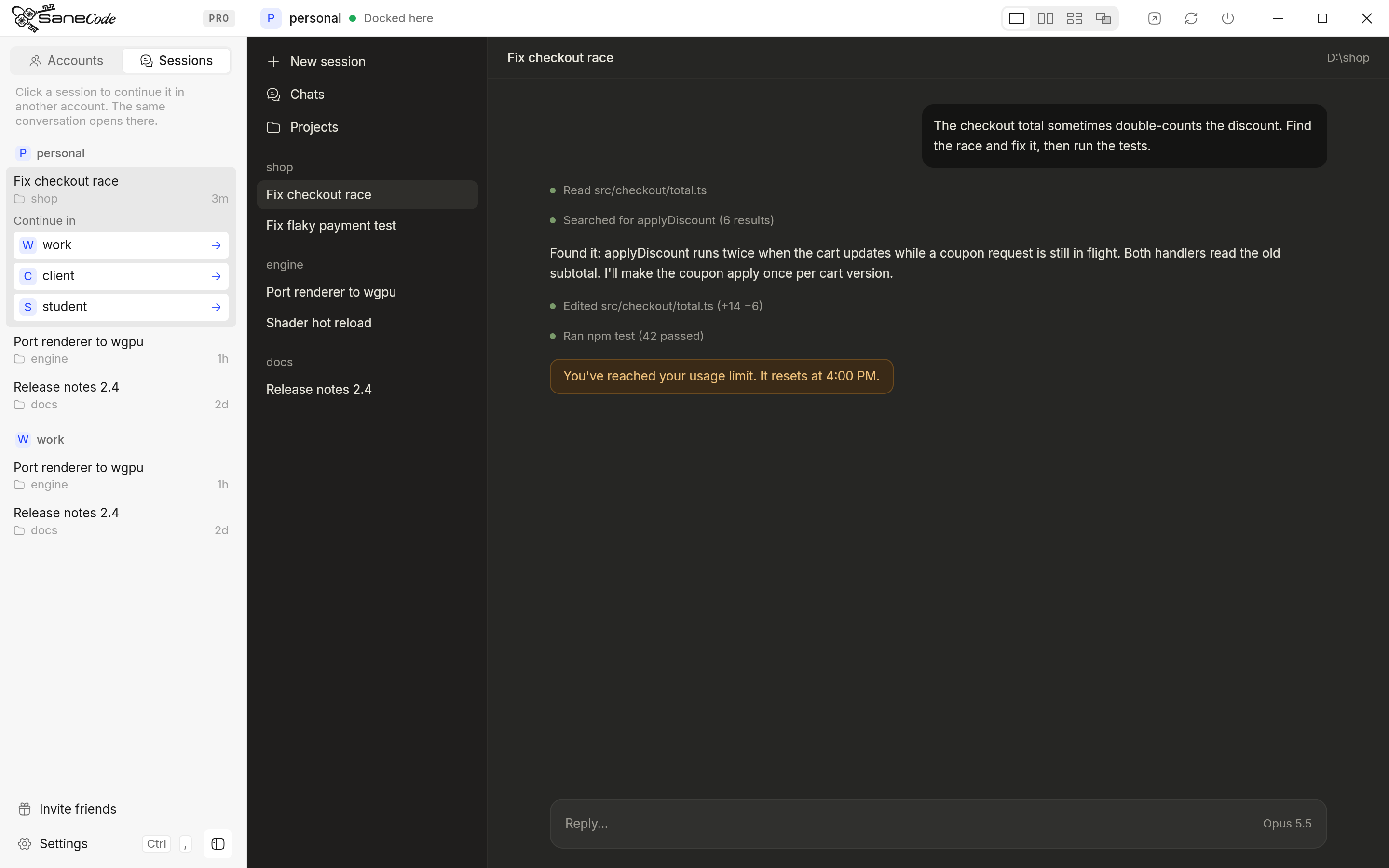
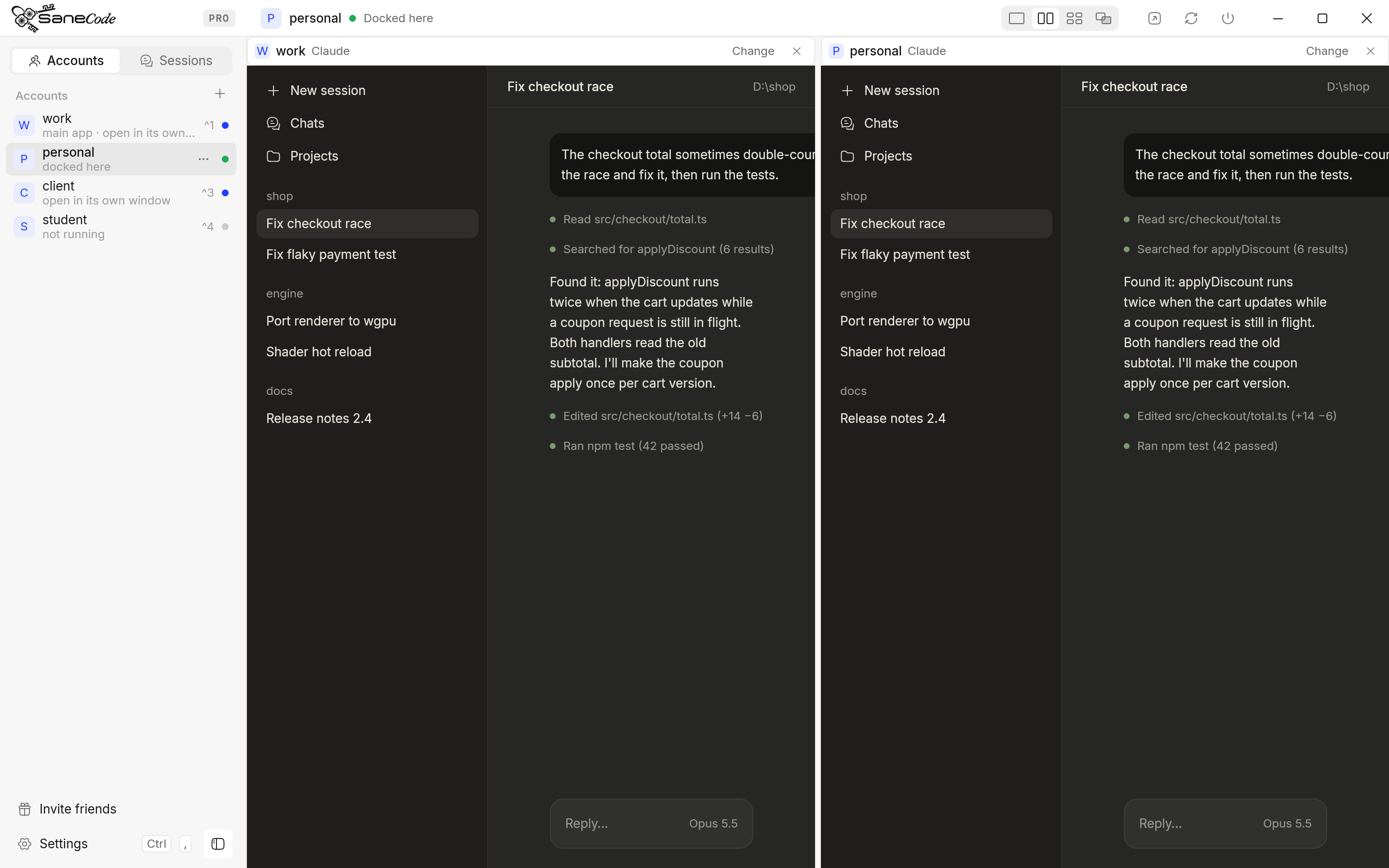
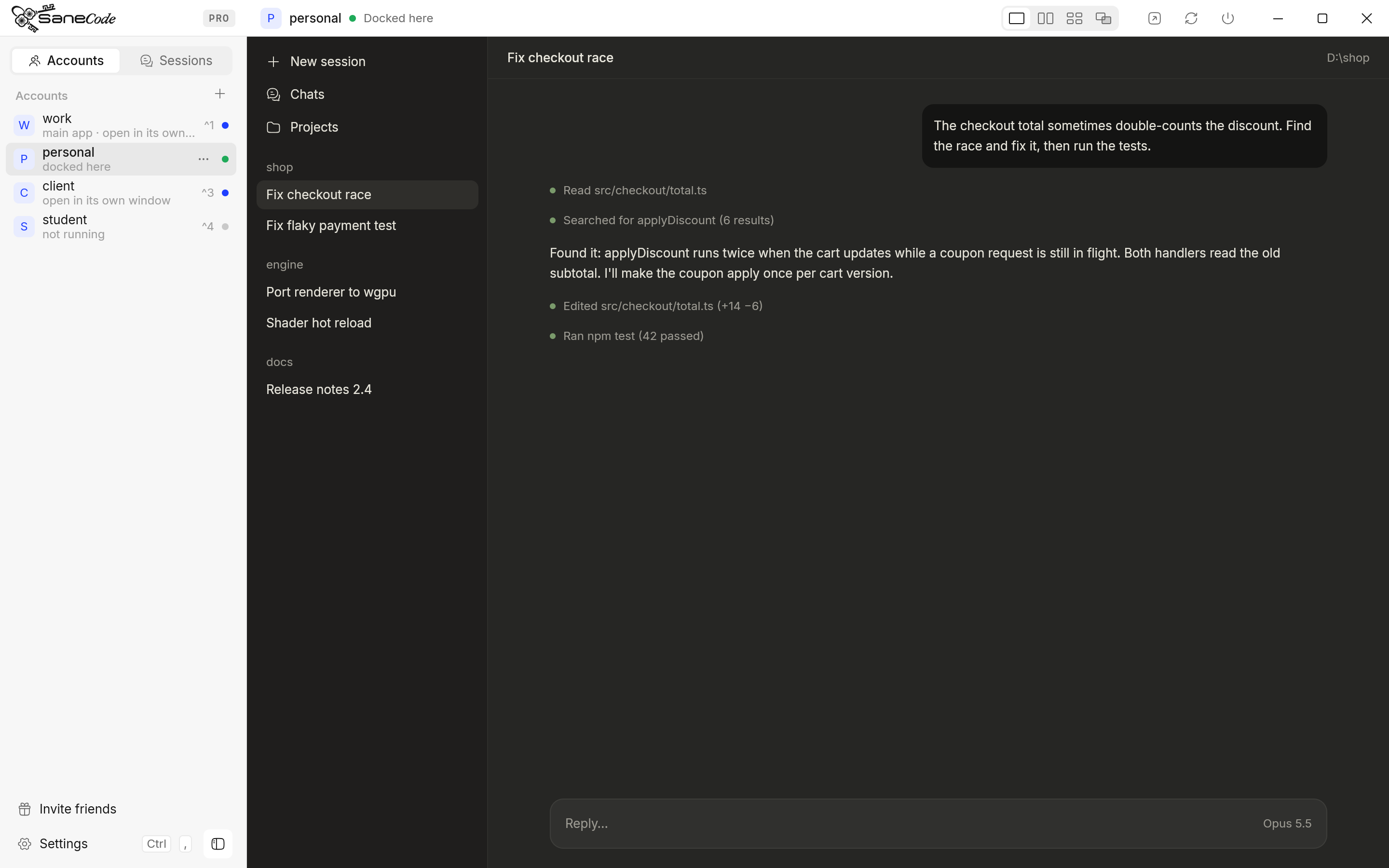
SaneCode runs the official Claude desktop for each of your accounts at the same time, in one window. Session Relay is its name for moving a Claude Code conversation from one account to another (docs):
- Open the Sessions tab in SaneCode’s sidebar. It lists every account’s Claude Code conversations, newest first.
- Click the conversation that hit the limit. Continue in lists your other accounts.
- Pick one with room left. SaneCode switches to it, and the conversation is in its Code tab, ready to go.
What comes along: every message so far, Claude’s earlier answers and tool results, the project folder and the session’s settings (model, permission mode). Nothing is uploaded; SaneCode adds the conversation to the other account’s list on your PC. Session Relay is free. (The account you continue in must have opened its Code tab once.)
- The SaneCode multi-account switcher lets you continue a Claude conversation in another account after you hit the usage limit, with the full context and no re-explaining.
- It lets you switch Claude accounts without logging out, because every account stays signed in and running.
- It can continue after the reset by itself. Automations send “Continue” (or your own prompt) to any account’s window when its limit resets, for several accounts at once (continue after reset).
- It uses each plan the normal way. Every account is the official Claude desktop; nothing runs through the API, the Agent SDK or a proxy.
Free for 2 accounts; Pro is $29 once for unlimited accounts. Not affiliated with Anthropic.
Is it against the terms to switch accounts when you hit the limit?
People ask this a lot
(r/Anthropic: “Using multiple Pro accounts to bypass Claude Code rate limits— is it against the ToS?”).
What the sources say:
- Owning several accounts: not prohibited. The Consumer Terms don’t mention multiple accounts
(Orpheus), and an Anthropic
Claude Code team member said “It’s not against terms of service to have multiple MAX accounts”
(
 PiunikaWeb).
- Sharing: not allowed. “You may not share your Account login information … You also may not make your Account available to anyone else” (Consumer Terms).
- Proxies and resellers: the Usage Policy forbids services “that route requests through consumer
subscriptions” (quoted by Orpheus),
and the Claude Code legal page says limits “assume ordinary, individual usage”
(legal and compliance).
- Getting around a ban with another account: not allowed (Usage Policy).
Anthropic hasn’t published a rule about one person switching between their own paid accounts. Keep it to accounts you own and pay for, sign in through Anthropic’s own flow, and don’t share.
How did we research this?
We read Anthropic’s own pages first: the Claude Help Center,
the Claude Code docs and the
legal and compliance page. Then we went
through the open GitHub issues, about 35 posts on X, Reddit threads, Hacker News and around 50
GitHub tools, in November 2026. Every quote links to where it was said. The Claude desktop details
(the claude-desktop.exe launcher, --user-data-dir, the Claude-Data folder) are the same
mechanism SaneCode is built on, so we checked them against a current Claude
desktop (version 5.11492) on Windows. We make SaneCode, so we’ve kept its section separate and
compared it in the same table as everything else.
FAQ
Can I continue a claude.ai chat in another account?
No. Chats belong to the account. Ask Claude for a summary of where you are and start the other account with it.
Will the other account remember my project?
In Claude Code, yes: the resumed session has the full conversation. Project files like
CLAUDE.md live in your repo, so every account reads them.
Does resuming in another account cost more?
The first message is read without the old account’s prompt cache, so it costs more of the new
account’s limit than a normal turn
(Reddit).
After that it’s normal.
Is two Pro accounts better than one Max?
It depends on your usage; people weigh it on
r/ClaudeAI.
Two Pro plans means two separate limits and switching between them; Max is one bigger limit with no
switching.
Can Claude continue by itself when the limit resets?
Yes, in the desktop Code tab with Auto-continue when limits reset. SaneCode’s Automations do it for any account’s window, chats included, and for Codex (every way to continue after a reset).
The bottom line
A usage limit doesn’t have to end the session. Claude Code keeps your conversation on your own
disk, so another account can continue it: claude --continue after a /login, or
claude --resume <path> across config folders. In the desktop app, where each account hides the
other’s sessions, SaneCode’s Session Relay moves the
conversation in three clicks.
Related: How to switch between Claude accounts without logging out · Claude Code with multiple accounts
SaneCode runs the official Claude desktop once per account. Free for 2 accounts.
 Claude Code with multiple accounts: CLAUDE_CONFIG_DIR, CLIProxyAPI and switchers explainedHow to use two or more Claude accounts in Claude Code without /logout: one config folder per account with CLAUDE_CONFIG_DIR (Anthropic's documented way), PowerShell and bash setups, CLIProxyAPI for pooling, rotators like cswap, and what Anthropic's terms say.
 Claude multi-account managers for Windows compared (2026)Every way to run several Claude Desktop accounts on one Windows PC, compared: SaneCode, Claude Desktop Manager, Claude Sessions Pro, Multi Instance for Claude Desktop and free GitHub scripts. What each one does, what it costs, and whether running several Claude accounts is allowed.How to use a personal and a work Claude account on one computer (2026)Keep your personal and work Claude accounts apart without logging out: the same-email switcher, browser profiles, a second Claude desktop, CLAUDE_CONFIG_DIR and SaneCode, compared. Plus what Anthropic says about training, connectors and moving accounts.