
On this page
- Key takeaways
- Why keep work and personal Claude accounts separate?
- Are your accounts on the same email? Use Claude’s built-in switcher
- Different emails? Here are your options
- Which way is best for a personal and a work account? (Comparison)
- How do you set up work and personal accounts in SaneCode?
- What mistakes should you avoid?
- How did we research this?
- FAQ
- The bottom line
By  @inxanity06, founder of SaneCode · Updated
How to use a personal and a work Claude account on one computer
Short answer: If both accounts use the same email (a personal plan plus your company’s Team or Enterprise seat), click your initials in Claude and pick the other one. If they use different emails, Claude desktop makes you log out to switch. To keep both signed in, put one in a browser profile, run a second Claude desktop with its own data folder, or use SaneCode, which runs both accounts’ official Claude desktop side by side in one window. Two accounts are free.
You’re not alone in wanting this. Sentry’s co-founder asked on X: “is there an easy way with Claude
Code Desktop to have an account switcher? e.g. if you need to swap between a work and a personal
account?” (@zeeg, 116 likes). A GitHub issue is
titled, bluntly, “ Switching between personal and work Claude Code accounts is abysmal”.
This guide is for anyone with two Claude accounts: an employee with a company seat and a personal Pro plan, a freelancer with a client’s account, or a developer who keeps side projects off the work bill.
Key takeaways
- Same email? Claude has a built-in switcher for a personal account and a Team or Enterprise
account on the same address (
 Claude Help Center).
- Different emails? The desktop app makes you log out. Anthropic’s answer is “log out, then log in with the other email address”.
- Keep them apart on purpose. Work accounts are under commercial terms and aren’t used to train models by default; personal ones follow your Model Improvement setting.
- Don’t move your personal account into the company org unless you mean it: “A move can’t be
reversed” (Help Center).
- Fastest way to have both open all day: SaneCode runs each account’s official Claude desktop at once, in one window, free for 2 accounts.
Why keep work and personal Claude accounts separate?
Your work account and your personal account follow different rules. Mixing them causes real problems.
- Training. Personal plans (Free, Pro, Max) use your chats to improve Claude only if you allow
it, under Model Improvement in Privacy Settings
(
 Anthropic Privacy Center).
Team and Enterprise are commercial products, and Anthropic doesn’t train on them by default
(commercial data).
Company code belongs in the account your company’s terms cover.
- Connectors and tools. Connectors such as Google Drive, Slack or Atlassian belong to the
account that added them. A Reddit user noticed connectors “seem to bind to the login account”
(
 r/ClaudeCode).
A client’s connectors should stay in that client’s account.
- Billing and limits. Each account has its own plan and its own usage limits. Side projects on the work seat eat the work limit, and your company pays for them.
- Leaving the job. When you leave, the company account goes with it. Your personal chats, projects and skills should not be in there.
Are your accounts on the same email? Use Claude’s built-in switcher
Claude has one native switcher, for one case: “an individual Claude account and a Team or
Enterprise plan account tied to the same email address”
(Help Center).
- Click your initials in the bottom left corner of Claude.
- Pick the other account.
- Look for the check mark next to the active one.
The catch: only one account is active at a time, so you switch back and forth. And check how
your company set up its organization: “Enterprise admins can claim all existing personal accounts
on their organization’s verified domain”
(Help Center).
If your personal account uses your work email, it can end up inside the company’s workspace. A
personal account on your own email avoids that.
Different emails? Here are your options
Most people have their personal account on a personal email. Then Claude desktop has no switcher: you “log out, then log in with the other email address”. Each switch means an email link or a Google sign-in, and the Code tab’s sidebar empties because it lists only the signed-in account’s sessions. These are the ways around it.
Option 1: Personal account in a browser profile
Best for: chatting with the personal account now and then.
Keep the work account in the Claude desktop app. Make a second Chrome or Edge profile, open
 claude.ai there and sign in with the personal account. Both stay signed in.
The personal side gets no desktop app: no Code tab with local folders, no Cowork, no desktop
extensions. Full steps are in Method 1 of our switching guide.
Option 2: A second Claude desktop with its own data folder
Best for: people comfortable with PowerShell who want two full apps.
Claude desktop is an Electron app. Started with --user-data-dir pointing at another folder, a
second copy runs next to the first with its own sign-in. You get two windows with the same icon,
and signing in needs care because the sign-in link goes back to your first Claude. The
copy-and-paste steps are in Method 2 of our switching guide.
Option 3: Claude Code in the terminal with CLAUDE_CONFIG_DIR
Best for: developers who use Claude Code from the command line.
Anthropic documents it: give each account its own config folder
( Claude Code docs). Run
CLAUDE_CONFIG_DIR=~/.claude-work claude for work and plain claude for personal. It doesn’t help
the desktop app’s Code tab. Setup for Windows, macOS and Linux is in
Claude Code with multiple accounts.
Option 4: SaneCode, both accounts in one window
Best for: using both accounts every day in the Claude desktop app.
SaneCode runs the official Claude desktop once per account, both signed in at the same time, and docks them beside a sidebar. You click work or personal, or press Ctrl+1 and Ctrl+2. Nothing logs out.
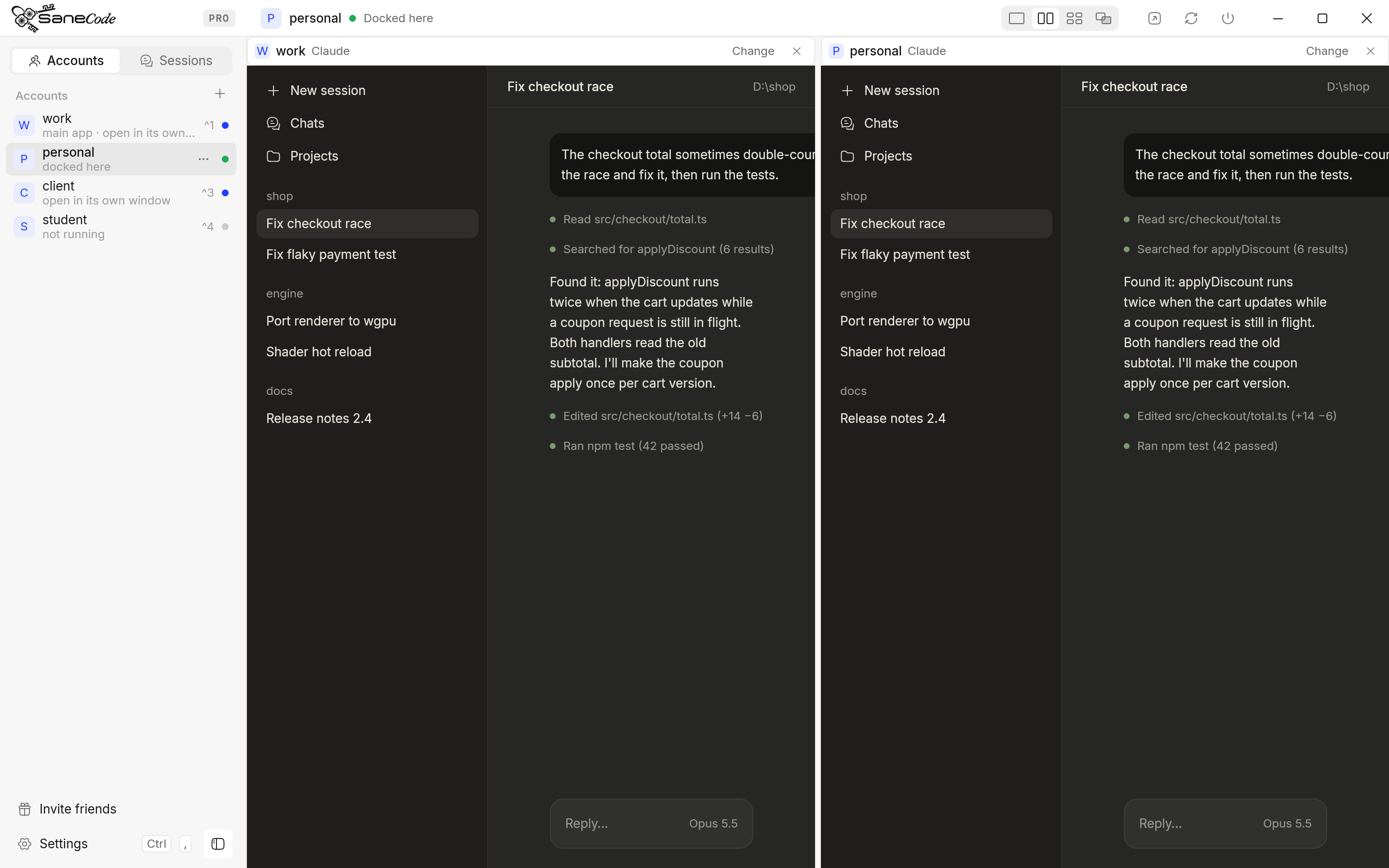
Which way is best for a personal and a work account? (Comparison)
| Same-email switcher | Browser profile | Second Claude desktop | CLAUDE_CONFIG_DIR |
SaneCode | |
|---|---|---|---|---|---|
| Works with different emails | ❌ | ✅ | ✅ | ✅ | ✅ |
| Both signed in at once | ❌ one active | ✅ | ✅ | ✅ (terminals) | ✅ |
| Full desktop app for both (Code tab, Cowork) | ✅ | ❌ one is web | ✅ | ❌ CLI only | ✅ |
| Both in one window | — | ❌ | ❌ two windows | ❌ | ✅ |
| Each account’s connectors stay its own | ✅ | ✅ | ✅ | ✅ | ✅ |
| Move a conversation between them | ❌ | ❌ | By hand | claude --resume |
✅ Session Relay |
| No terminal needed | ✅ | ✅ | ❌ | ❌ | ✅ |
| Setup time | none | 2 min | 15–30 min | 5 min | ~2 min |
| Cost | free | free | free | free | free for 2 accounts |
Best for:
- Employees with a company Team seat on the same email: the built-in switcher is enough if you switch a few times a day.
- Personal account you rarely open: a browser profile.
- Terminal-only developers:
CLAUDE_CONFIG_DIR. - Freelancers and anyone who works in both all day: SaneCode, so both stay open and a long task keeps running in one while you use the other.
How do you set up work and personal accounts in SaneCode?
It takes about two minutes. Your current Claude becomes the first account, with nothing moved.
- Install SaneCode and open it. It finds the Claude desktop you already use.
- Press + next to Accounts and name the second one, for example
personal(adding accounts). - Sign in once with the personal account. A built-in guide shows each step, including when the browser sends the sign-in to your other Claude.
- Click work or personal in the sidebar to switch, or show both with Split.
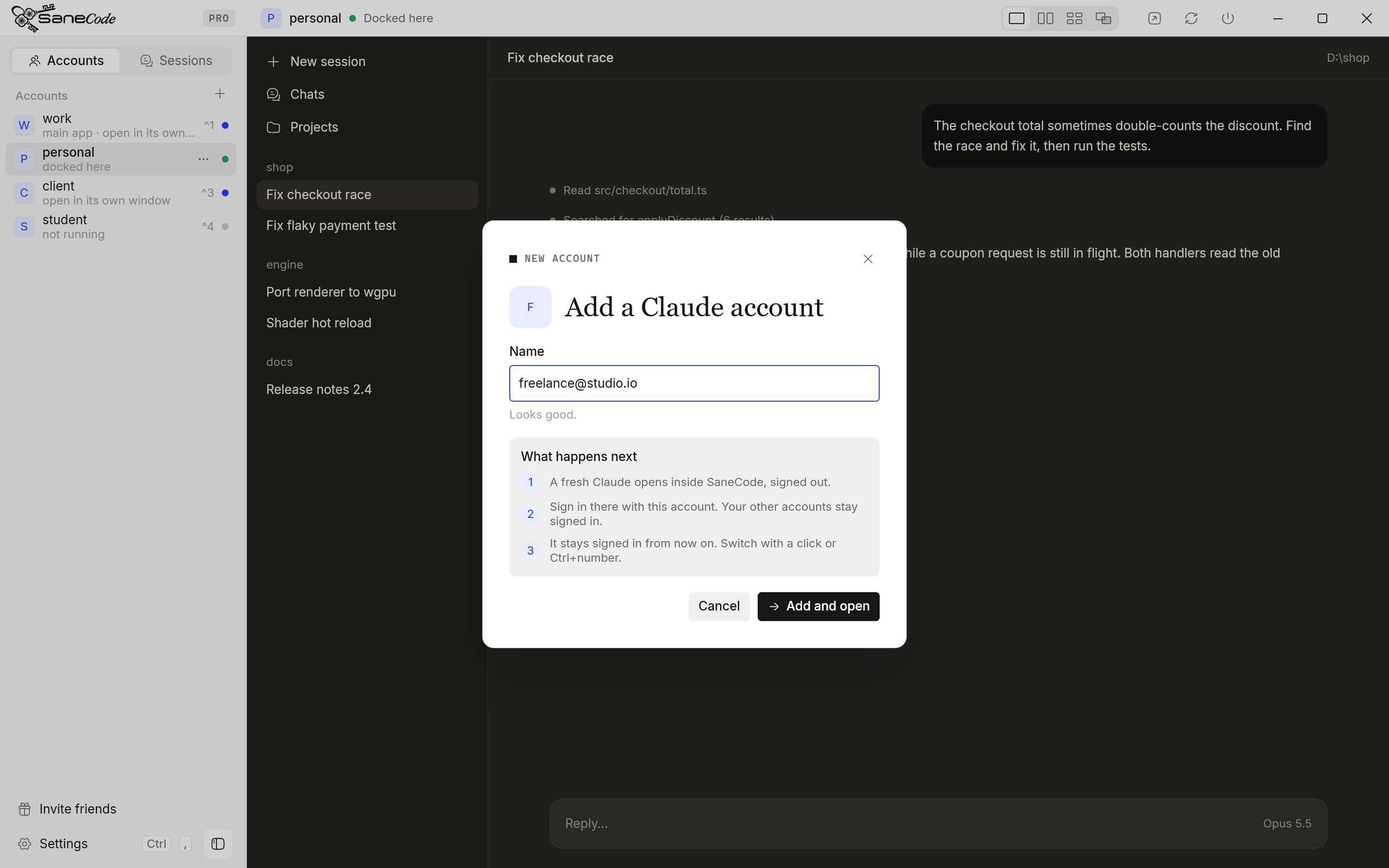
What it costs: SaneCode is free for 2 accounts, which is exactly a work and a personal account. Pro is $29 once for more accounts (pricing). Your Claude plans are billed by Anthropic as usual, and each account’s usage counts only against its own plan.
What happens next: each account keeps its own sign-in, chats, connectors and settings. Plugins and skills you add in Claude desktop belong to that account too, so add them in both (what’s shared). If the work account hits its usage limit, you can continue the conversation in the personal one, if that’s allowed for that work.
What mistakes should you avoid?
- Signing the new account into the wrong Claude. A Google sign-in or email link opens your first Claude, not the new one. Type the email code instead, or let SaneCode’s guide hand the link over.
- Claude in Chrome on the wrong account. The extension “must be signed in to the same
organization as Claude Code”, or you get “Browser extension is not connected”
(Claude in Chrome docs). SaneCode’s
Shared browser connects every account to one Chrome profile.
- Moving your personal account into the company org by accident. “A move can’t be reversed,
and not everything moves”, and “There’s no migration path for skills”
(Help Center).
- Sharing one account between two people. Each person needs their own account; sharing a login is against Anthropic’s Consumer Terms.
How did we research this?
We read Anthropic’s Help Center, Privacy Center and Claude Code docs, linked above, in November 2026. The questions people ask come from Reddit, X and Anthropic’s GitHub issues, and every quote links to its post. We make SaneCode, which runs one official Claude desktop per account the same way Option 2 does, so we’ve compared it in the same table as the free options.
FAQ
Can I have a personal and a work Claude account?
Yes. Many people do. Each account has its own plan, chats and settings. Owning more than one account isn’t against Anthropic’s terms; sharing one is.
How do I switch between my personal and work Claude accounts?
On the same email, click your initials in Claude and pick the account. On different emails, log out and log in again, or keep both signed in with a browser profile, a second Claude desktop or SaneCode.
Can I use both accounts at the same time?
Not in one Claude desktop app. Use a browser profile for one, run a second Claude desktop with its own data folder, or use SaneCode, which shows both side by side.
Will my company see my personal chats?
They’re separate accounts, so your personal chats aren’t in the company’s workspace. The exception is moving or having your personal account claimed into the organization: Enterprise admins can claim personal accounts on the company’s verified email domain. Keep your personal account on a personal email.
Is my work account used to train Claude?
Not by default. Team and Enterprise are commercial products, and Anthropic doesn’t train on them by default. Personal accounts follow your Model Improvement setting.
Do plugins and skills work in both accounts?
Not by themselves. Plugins and skills added in Claude desktop are installed into one account,
per organization, so add them in each account. Claude Code’s own folder, %USERPROFILE%\.claude,
is one per PC (details).
How much does it cost to run both?
Your two Claude plans cost what they cost on their own. SaneCode is free for 2 accounts.
The bottom line
If your work and personal Claude accounts share an email, use Claude’s own switcher. If they
don’t, Claude desktop makes you log out every time. A browser profile is the quick fix, and
CLAUDE_CONFIG_DIR covers the terminal. To have both full Claude desktops signed in all day, in one
window, try SaneCode free: it’s built for exactly two accounts like these.
SaneCode runs the official Claude desktop once per account. Free for 2 accounts.
Claude Code with multiple accounts: CLAUDE_CONFIG_DIR, CLIProxyAPI and switchers explainedHow to use two or more Claude accounts in Claude Code without /logout: one config folder per account with CLAUDE_CONFIG_DIR (Anthropic's documented way), PowerShell and bash setups, CLIProxyAPI for pooling, rotators like cswap, and what Anthropic's terms say.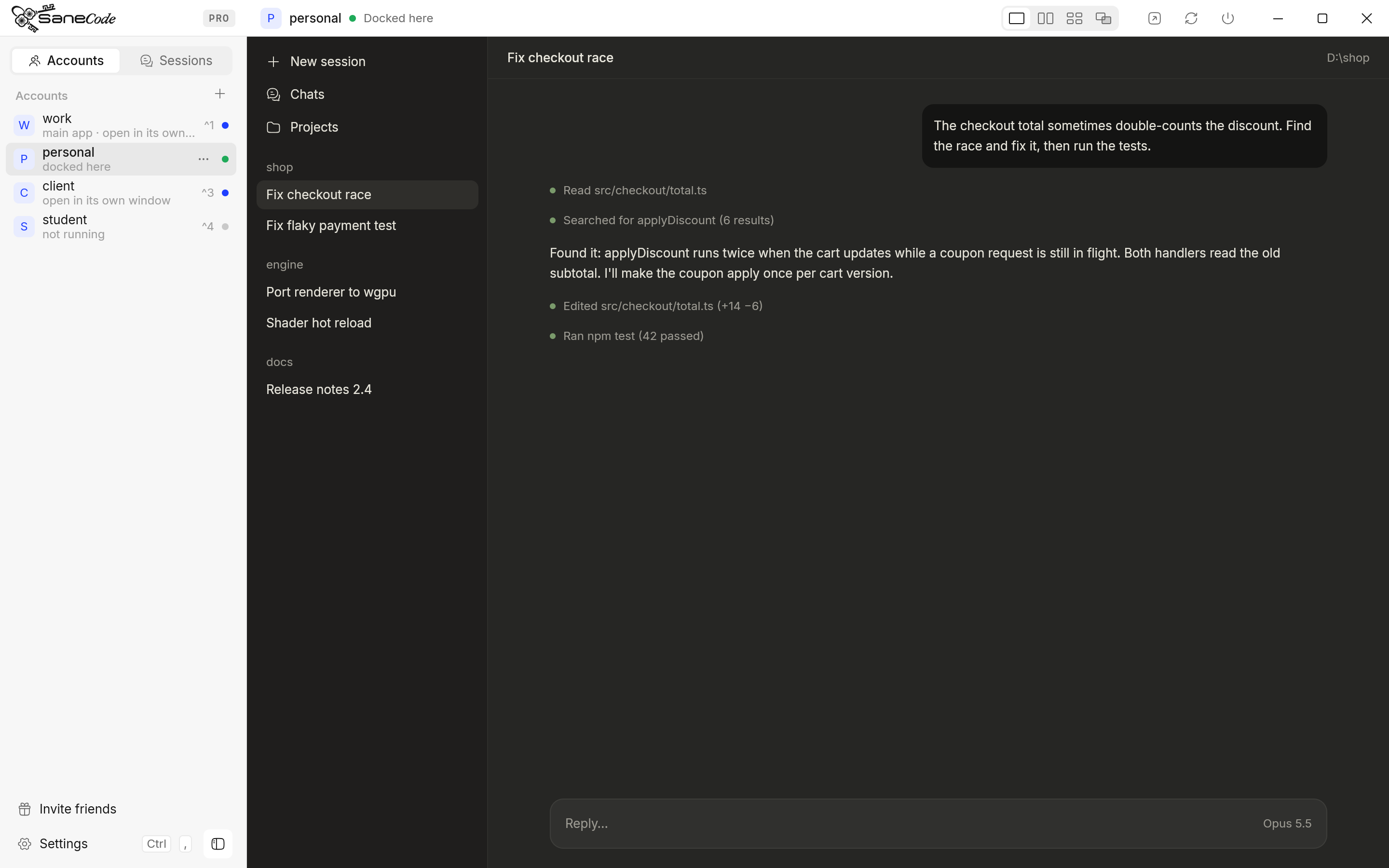 Claude multi-account managers for Windows compared (2026)Every way to run several Claude Desktop accounts on one Windows PC, compared: SaneCode, Claude Desktop Manager, Claude Sessions Pro, Multi Instance for Claude Desktop and free GitHub scripts. What each one does, what it costs, and whether running several Claude accounts is allowed.
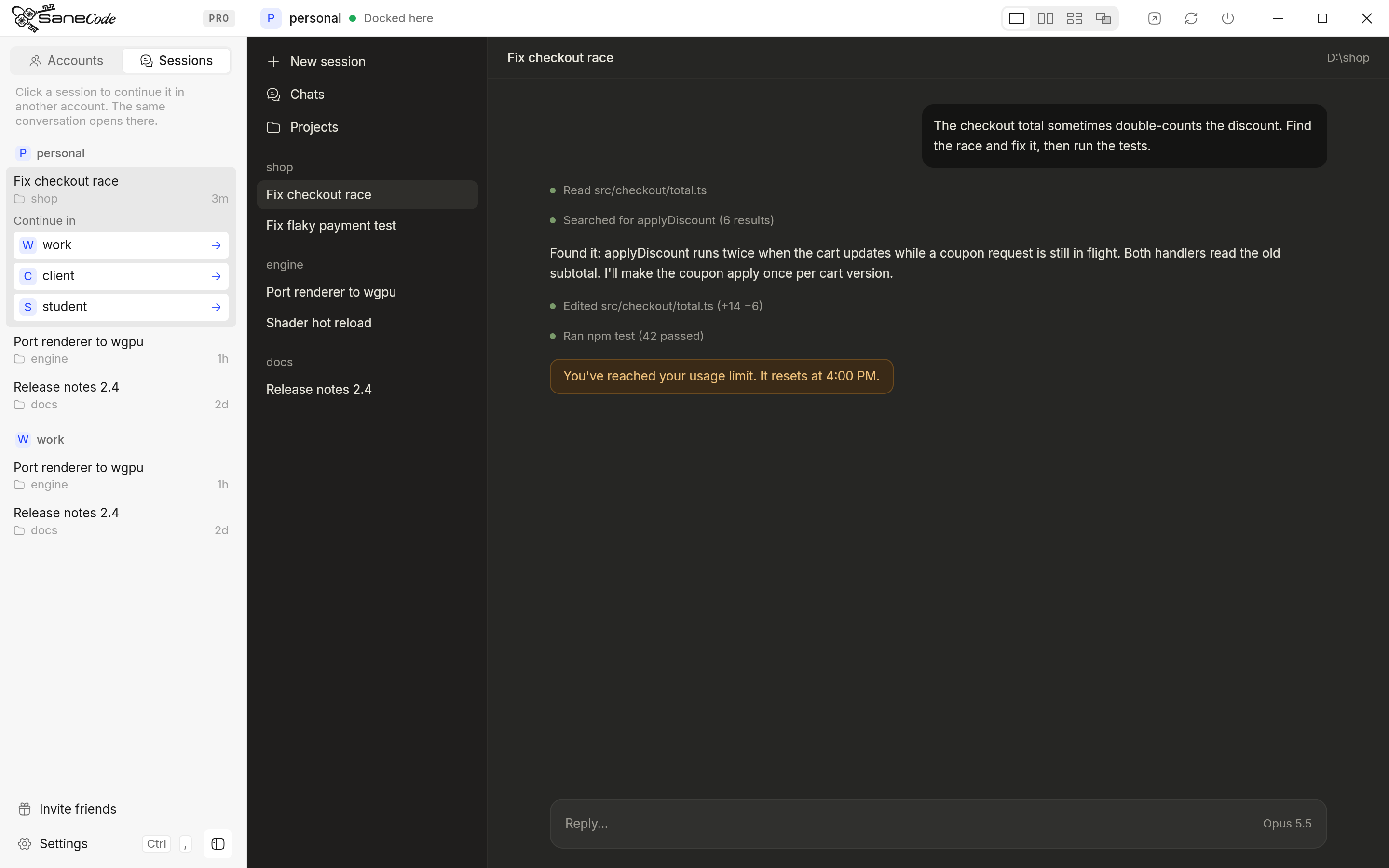 Hit your Claude usage limit? How to continue the same conversation in another accountWhen Claude says you've reached your usage limit mid-task, you can wait, or carry the same Claude Code conversation into your other account with full context. Step-by-step for the CLI (claude --resume), the desktop Code tab, auto-switchers, and what's allowed.