
Shared MCP servers
If you use the same  MCP servers in several Claude accounts (a filesystem server, a database, a
 Notion or GitHub server you run locally), you normally have to add each one to every account’s
Claude config. SaneCode keeps one shared list and adds it to every account for you. Other ways to do it, compared: How to share MCP servers across multiple Claude accounts.
Set it up
- Open Settings → Shared MCP servers → Edit shared list. A file opens
(
%APPDATA%\SaneCode\mcp.json). - Add servers in the same format as
 Claude desktop’s own config:
{
  "mcpServers": {
    "filesystem": {
      "command": "npx",
      "args": ["-y", "@modelcontextprotocol/server-filesystem", "C:\\Users\\you\\Documents"]
    }
  }
}- Press Apply to all accounts. SaneCode also applies the list every time it starts.
- A Claude that’s already open loads the new servers after a Restart (title bar).
What it changes, exactly
- Each account’s
claude_desktop_config.jsongets the shared servers under their names. - Servers an account had on its own are left alone.
- Remove a server from the shared list and SaneCode removes it from the accounts it added it to, and only those.
Which accounts get a server?
Every account, unless you pick. Under Settings → Shared MCP servers each server in the list shows your accounts: click one to take the server away from it or give it back, or press Every account. SaneCode applies the change at once (an open Claude loads it after a restart).
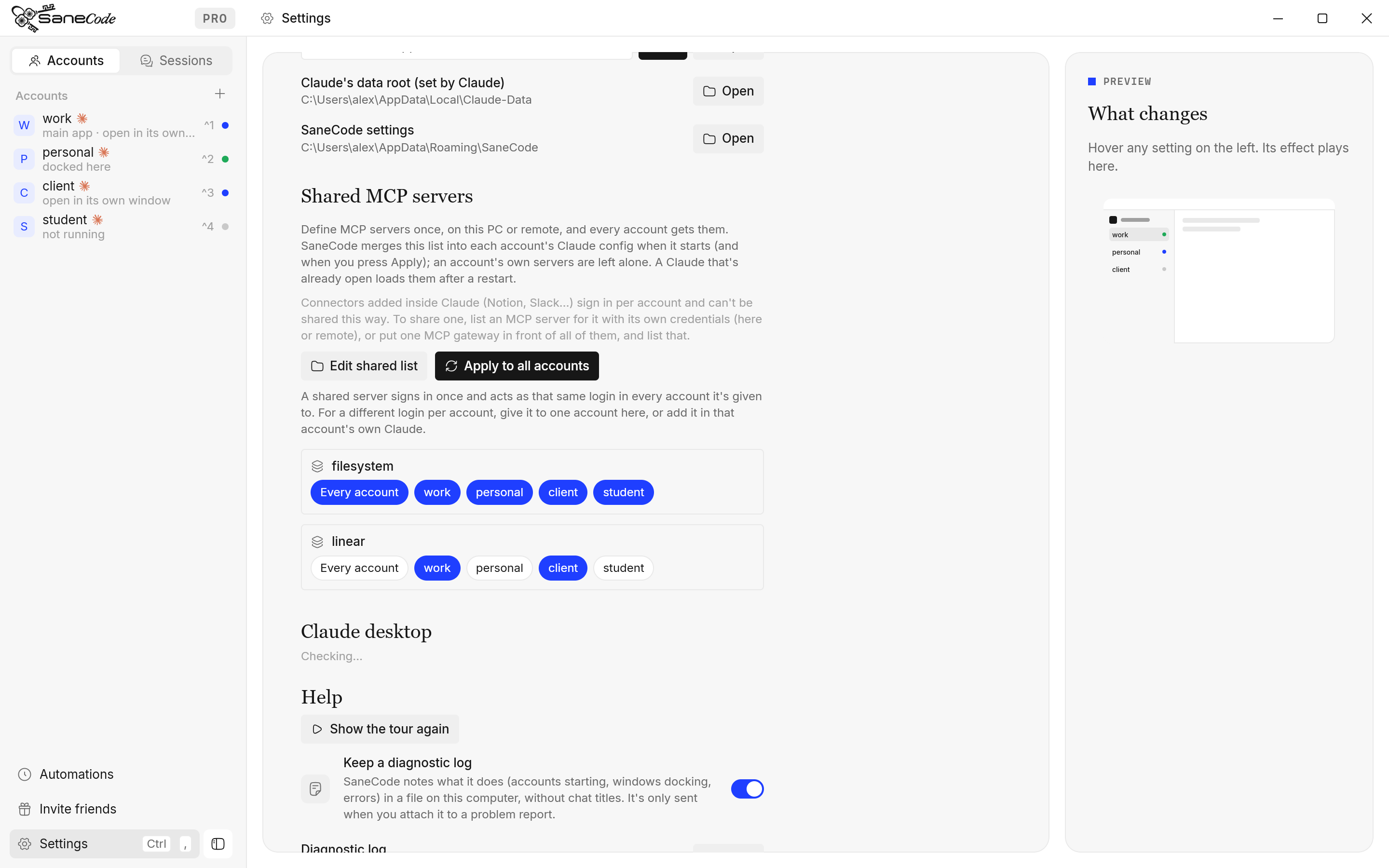
In the file it’s one extra field, which SaneCode keeps for itself and never writes into Claude’s
config: "accounts": ["work@acme.com", "client@northwind.dev"]. No field means every account,
including ones you add later.
Is a shared server the same login in every account?
Yes. Signing in to an MCP server has nothing to do with your Claude account: you sign in to the service (Linear, GitHub, Notion…), and the server only ever sees that service’s token, never which Claude account is asking. So a shared server acts as the same login in every account it’s given to: an issue created from your personal Claude shows up in Linear as the same user as one created from your work Claude.
For a different login per account (your work Linear in the work account, a personal one in another), give the server to one account here, or add it in that account’s own Claude config, which SaneCode never touches. Each account then signs in to the service on its own.
How do servers that need a key or a sign-in work?
Every account gets the same entry, so every account uses the same credentials. Four kinds:
1. API key or token for a server on this PC. Put it in env, the way the
 MCP spec asks local
servers to “retrieve credentials from the environment”. SaneCode writes the entry as it is.
"github": {
  "command": "npx",
  "args": ["-y", "@modelcontextprotocol/server-github"],
  "env": { "GITHUB_PERSONAL_ACCESS_TOKEN": "ghp_…" }
}
2. Remote server that signs in with OAuth (Linear, Atlassian, most hosted servers). Paste the URL the provider documents, in the same shape Claude Code uses:
"linear": { "type": "http", "url": "https://mcp.linear.app/mcp" }Claude desktop only runs servers with a command from its config file (it skips a bare url with
“Some MCP servers couldn’t be loaded”), so SaneCode writes each account an
npx -y mcp-remote https://mcp.linear.app/mcp entry.  mcp-remote
does the OAuth: the first time a Claude uses the server, your browser opens once to sign in. It
keeps the tokens in
%USERPROFILE%\.mcp-auth, which every account on your Windows user shares, so
one sign-in covers every account and refreshes are coordinated between them. Use "type": "sse"
for an older SSE-only server. Needs  Node.js (for
npx).
If the provider gave you an OAuth client instead of letting apps register themselves, add
"oauth": { "clientId": "…", "callbackPort": 9696 } (the port you registered as the redirect).
3. Remote server with an API key in a header.
"my-api": {
  "type": "http",
  "url": "https://mcp.example.com/mcp",
  "headers": { "Authorization": "Bearer sk-…" }
}
SaneCode passes the header to mcp-remote through env (--header Authorization:${SANECODE_HEADER_1}),
never on the command line: Claude on Windows doesn’t escape spaces in args, which breaks
Bearer … values (mcp-remote README).
4. Connectors you add inside Claude (Customize → Connectors: Notion, Slack, Google Drive…).
Claude connects to them “from Anthropic’s cloud infrastructure, rather than from your local device”
and each account signs in to its own (Anthropic).
They can’t be shared from outside: connect them in each account, or list the same service here as
type 2 or 3 if it offers a remote MCP URL.
A common pattern is a single MCP gateway that connects to all your tools and is the only server you list here; every account then reaches all of them through it.
Where do my keys go?
Only into each account’s own claude_desktop_config.json, which is where Claude reads them, and
into your shared list (%APPDATA%\SaneCode\mcp.json). SaneCode doesn’t log them or send them
anywhere: its notes and diagnostic log name servers, never values.
What if an entry is wrong?
- An entry Claude couldn’t run (no
commandorurl, a number inenv, aheadersHelper) isn’t written to any account; SaneCode names it and says why. - If
mcp.jsonisn’t valid JSON (a missing comma), SaneCode changes nothing and tells you, so a typo never takes servers out of your accounts. - Want a server signed in to a different identity in each account (two Atlassian sites, say)? Add it in each account’s own config instead: shared servers share one sign-in.
Related: Accounts · Settings · Why native
Every Claude account in one Claude desktop, on Windows. Free for 2 accounts.
Written by the founder,  @inxanity06 · Updated 2026-11-17