
On this page
- Key takeaways
- Where does Claude Code keep your login?
- Method 1: One config folder per account (CLAUDE_CONFIG_DIR)
- Method 2: Just /login again in place
- Method 3: CLIProxyAPI (pool all your accounts)
- Method 4: Account switchers and auto-rotators
- Comparison: which multi-account setup fits?
- Using Claude Code in the desktop app? Meet SaneCode
- How did we research this?
- FAQ
- The bottom line
By  @inxanity06, founder of SaneCode · Updated
Claude Code with multiple accounts: the complete guide
Short answer: Give each account its own config folder. Start Claude Code with
CLAUDE_CONFIG_DIR=~/.claude-work for the work account and plain claude for the personal one;
both stay signed in, each with its own usage limits. That’s  Anthropic’s documented way.
If you use Claude Code in the desktop app’s Code tab, it ignores that variable, so use
SaneCode there instead.
/login in Claude Code is global. Sign in with your work account in one terminal and every other
terminal on the machine is now on the work account too. If you pay for two plans, or keep a
personal plan next to your company seat, you end up typing /logout and /login all day.
People are not happy about it. One GitHub issue is literally titled
“ Switching between personal and work Claude Code accounts is abysmal”.
On Reddit, a developer running five projects in parallel asked:
“Is it possible to give each claude window or workspace its own claude login? Not sure how. Seems like /login is global.” (
r/ClaudeCode)
Good news: there’s an official answer, and it takes five minutes. This guide walks through it, then covers the power-user options (CLIProxyAPI, auto-switchers) and where they get risky.
Key takeaways
- Give each account its own config folder. Set
CLAUDE_CONFIG_DIRbefore startingclaude. Anthropic documents this underLog in with multiple accounts. - Both accounts stay signed in at once, each in its own terminal, each with its own limits.
- It’s terminal-only in practice. The desktop Code tab and the VS Code extension don’t reliably
respect it (#109077).
- CLIProxyAPI pools several accounts behind one local endpoint. It’s popular, but it stores your logins and routes your requests, which Anthropic’s legal page warns against.
- Using Claude Code in the desktop app? SaneCode keeps every account’s official Claude desktop signed in, in one window, and moves Code sessions between them.
Where does Claude Code keep your login?
Claude Code keeps everything in one folder, ~/.claude (on Windows, %USERPROFILE%\.claude):
settings, session history, plugins and your login. On Windows the login sits in
%USERPROFILE%\.claude\.credentials.json; on macOS it’s in the Keychain
(credential management).
The key sentence in Anthropic’s docs: “If you’ve set the CLAUDE_CONFIG_DIR environment variable,
Claude Code keeps the .credentials.json file under that directory instead … and keys the macOS
Keychain entry to that directory too.” Different folder, different login. That’s the whole trick.
Method 1: One config folder per account (CLAUDE_CONFIG_DIR)
This is the method Anthropic recommends. When someone asked for multi-account support in
#24963, the answer was this variable, and
the docs now say it outright: CLAUDE_CONFIG_DIR is “useful for running multiple accounts side by
side” (env vars).
On Windows (PowerShell)
-
Open your PowerShell profile:
if (!(Test-Path $PROFILE)) { New-Item -ItemType File -Force $PROFILE | Out-Null } notepad $PROFILE -
Add one function per extra account and save:
function claude-work { $env:CLAUDE_CONFIG_DIR = "$HOME\.claude-work" try { claude @args } finally { Remove-Item Env:CLAUDE_CONFIG_DIR -ErrorAction SilentlyContinue } } -
Open a new PowerShell window and run
claude-work. The folder is new, so Claude Code walks you through login and setup. Sign in with the work account. -
Plain
claudekeeps using%USERPROFILE%\.claudeand your personal login.
Add claude-client, claude-max2 and so on the same way.
On macOS and Linux (bash or zsh)
Straight from Anthropic’s docs, in ~/.zshrc or ~/.bashrc:
alias claude-work='CLAUDE_CONFIG_DIR=~/.claude-work claude'Users on X run exactly this:
“you can run multiple Claude accounts side by side without ever logging out CLAUDE_CONFIG_DIR=
/.claude-work claude CLAUDE_CONFIG_DIR=/.claude-personal claude each points Claude Code at its own config folder … own session, own auth, own rate limit.” (
Check which account you’re on
Inside a session, run /status. Anthropic’s own troubleshooting uses it to see which organization
Claude Code is signed in to: “read the Organization row”
(Claude in Chrome docs).
What’s separate and what isn’t
Each folder is a full, separate Claude Code setup
( shuriken.sh,
 getcodeman.com):
| Per folder (set up once each) | Shared (lives in the repo) |
|---|---|
| Login and usage limits | Project CLAUDE.md |
Session history (/resume only lists that folder’s chats) |
Project .claude/settings.json |
Your personal settings.json, CLAUDE.md, skills, agents |
Project .mcp.json |
| Plugins and user-scope MCP servers | Your code |
| Folder trust decisions (each project asks again) |
The catches
- Terminal only, in practice. An open GitHub issue reports that the account switcher in the
desktop Code tab “still writes to the same
~/.claude”, that the VS Code extension ignores the variable (#30538), that /resumeignored it (#47825), and that VS Code login can
fail with a non-default folder (#84267).
All cited in #109077. - Not in project settings. Claude Code ignores
CLAUDE_CONFIG_DIRin project and local settings files (env vars). Set it in the shell. - Console sign-ins. “Separate directories don’t keep two Claude Console sign-ins without an API
key apart” (authentication). Subscription logins
are fine.
- Settings drift. Your skills and MCP servers have to be added to every folder (Claude desktop
accounts share them; SaneCode also shares desktop MCP servers). Tools like
yaluotao’s dotclaude (“Bind a repo to an
account with dc bind work”) and
thomasog/multi-claude (
--claude-code synced) help.
Method 2: Just /login again in place
If you only switch once in a while, you can stay in one folder and swap the login. Theo noted the CLI handles it well:
“CLI doesn’t care at all, you can just /login in a different tab and all traffic gets routed correctly on existing runs.” (
Two things to know, from a
Reddit thread:
connectors like Atlassian “seem to bind to the login account”, and the first prompt after a switch
can’t reuse the other account’s prompt cache, so a long conversation costs a full read on the new
account.
Method 3: CLIProxyAPI (pool all your accounts)
CLIProxyAPI is the most-starred tool in this space:
58,794 stars, MIT license, release v8.0.76 on November 17, 2026. It’s a local server that signs in
to your CLI subscriptions and exposes them as one Claude-, OpenAI- and Gemini-compatible API. Its
README lists “Claude Code support via OAuth login” and “Claude Code multi-account load balancing”.
Who uses it
It went mainstream after Theo moved T3 Code users toward it:
“Please don’t do this. If you have multiple accounts, don’t put them all in T3 Code. CLIProxy is trivial to set up. I’ve loved it so much that I forked it (hence “prox”). So easy to share my 7 Claude subs and 3 Codex subs across 12 computers :) Best part? Less random signouts” (
“8 claude ultra subs via cliproxyapi in a round robin … has felt limitless once i got the caching dialed in” (
How it works
- You add each account once with
--claude-login. Logins are saved in~/.cli-proxy-api. - Requests are spread across accounts.
routing.strategyisround-robin(default),weighted-round-robinorfill-first. - Session affinity keeps one conversation on one account (good for the prompt cache) and moves
it when that account fails or runs out.
session-affinity-rebind-on: "quota"moves only on quota and auth errors. - Failed requests are retried on other accounts for “HTTP 403, 408, 429, 500, 502, 503, and 504”.
(All from the project’s
config.example.yaml.)
Setup on Windows, step by step
-
Download the latest Windows release from
GitHub releases and unzip it, or install
the official desktop GUI, EasyCLIProxyAPI
(quick start). On macOS:
brew install cliproxyapi. -
Create the config. Copy
config.example.yamltoconfig.yaml. Sethost: "127.0.0.1"so only your PC can reach it, and replace the placeholder underaccess.api-keyswith a long random string. That key is what Claude Code will use to talk to the proxy; it is not an Anthropic key. -
Sign in each Claude account, one at a time (docs):
.\cli-proxy-api.exe --claude-loginA browser opens for Anthropic’s sign-in; the callback comes back on port 54545. Repeat for every account (use a different browser profile per account so you sign in as the right one).
-
Start the proxy:
.\cli-proxy-api.exe. It listens on port 8317. -
Point Claude Code at it in
%USERPROFILE%\.claude\settings.json(docs):{ "env": { "ANTHROPIC_BASE_URL": "http://127.0.0.1:8317", "ANTHROPIC_AUTH_TOKEN": "the-key-you-put-in-access.api-keys" } }
Wrappers make this easier: kaitranntt/ccs (2.9k stars, “Switch
between Claude accounts … via CLIProxyAPI OAuth proxy”) and the Windows tray fork
Finesssee/ProxyPilot.
Read this before you set it up
- It’s for Claude Code and other CLI tools only. It changes nothing in the Claude desktop app.
One user: “it burned through all my accounts 5h limit in 5m and did nothing on Claude Desktop”
(@GrubyiP).
- Anthropic’s terms. The Claude Code legal page
says subscription OAuth “is designed to support ordinary use of Claude Code and other native
Anthropic applications”, that developers “may not collect, store, or intermediate Claude.ai
credentials or session tokens”, and that Anthropic “may” enforce “without prior notice”. A
Reddit user summed up how many feel: “Using orchestrators such as T3 Code is in grey zone, which I
don’t want to risk loosing my sub for”
(r/ClaudeCode).
Even Theo says auto-switching inside T3 Code “violates TOS”
(@theo), and recommends doing it in a proxy
instead. Anthropic hasn’t said a proxy is fine.
- Your logins sit in a folder. Anyone who can read
~/.cli-proxy-apican use your accounts. Don’t bind it to all interfaces or share it with other people (sharing an account is against the Consumer Terms). - Check the sponsors. The README’s sponsor table advertises API resellers and residential-proxy services. That says nothing about the code, but it tells you who the audience is.
Method 4: Account switchers and auto-rotators
If you want one command to swap accounts, or swap automatically near the limit:
| Tool | Stars | What it does |
|---|---|---|
realiti4/claude-swap (cswap) |
4,779 | cswap add, cswap switch, and cswap auto, which polls usage every 60 s and switches before an account hits its limit (rules) |
| uwuclxdy/clauth |
335 | Multi-account manager, usage monitor, CLI and TUI |
| inulute/cux |
89 | “Auto-switches on rate limits and resumes your session” |
| rchaz/claude-nonstop |
27 | Watches for the limit message, switches, runs claude --resume |
| ming86/cc-account-switcher |
453 | Simple switcher (no pushes since July 2025) |
Most of these swap the saved login file. That’s convenient, but it’s the “collect, store” pattern the legal page talks about, so read the code before trusting one.
Comparison: which multi-account setup fits?
/login swap |
CLAUDE_CONFIG_DIR |
CLIProxyAPI | Auto-switchers | SaneCode | |
|---|---|---|---|---|---|
| No logout to change accounts | ❌ | ✅ | ✅ | ✅ | ✅ |
| Several accounts signed in at once | ❌ | ✅ | ✅ (pooled) | ❌ one active | ✅ |
| Separate history and settings per account | ❌ | ✅ | ❌ one config | ❌ | ✅ |
| Works in the desktop app’s Code tab | ✅ | ❌ (#109077) |
❌ | Some | ✅ |
| Continue a conversation in another account | claude --continue |
--resume <path> |
Automatic | Some | ✅ Session Relay |
| Login never copied, stored or proxied by a third party | ✅ | ✅ | ❌ | ❌ mostly | ✅ |
| Plan used the normal way (no proxy, no SDK) | ✅ | ✅ | ❌ | ✅ | ✅ |
| No terminal needed | ❌ | ❌ | ❌ | ❌ | ✅ |
Using Claude Code in the desktop app? Meet SaneCode
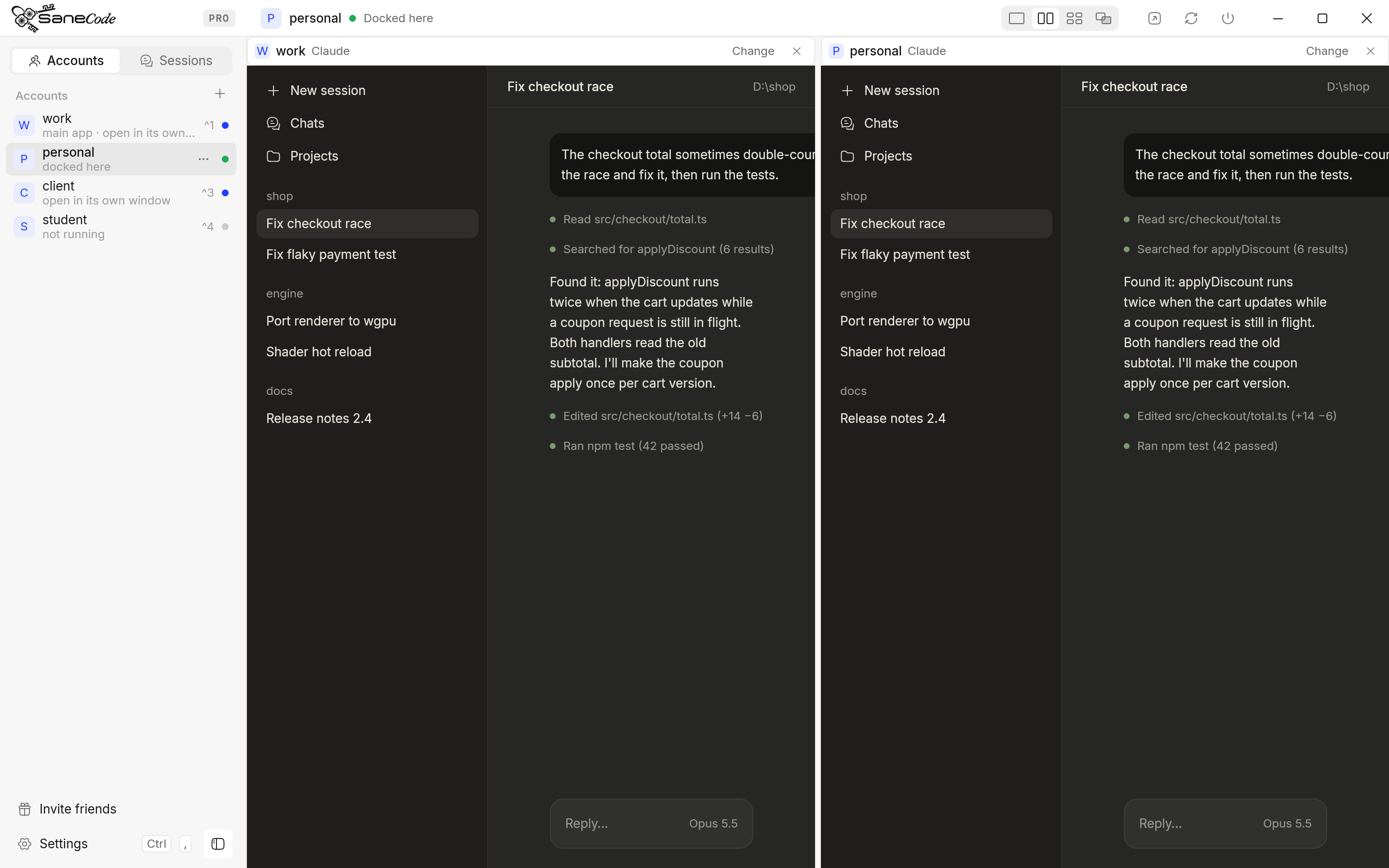
Most people who ask “how do I use Claude Code with two accounts” today use it in the Claude
desktop app’s Code tab, not the terminal. There, CLAUDE_CONFIG_DIR doesn’t help, and logging
out empties the session list. SaneCode is built for that:
- The SaneCode multi-account switcher lets you use Claude Code with multiple accounts in the desktop app. Each account is the official Claude desktop, with its own Code tab, signed in once. Switch with a click or Ctrl+number (how switching works).
- It lets you keep work and personal Claude Code accounts signed in at the same time, so a long task keeps running on one while you work on the other.
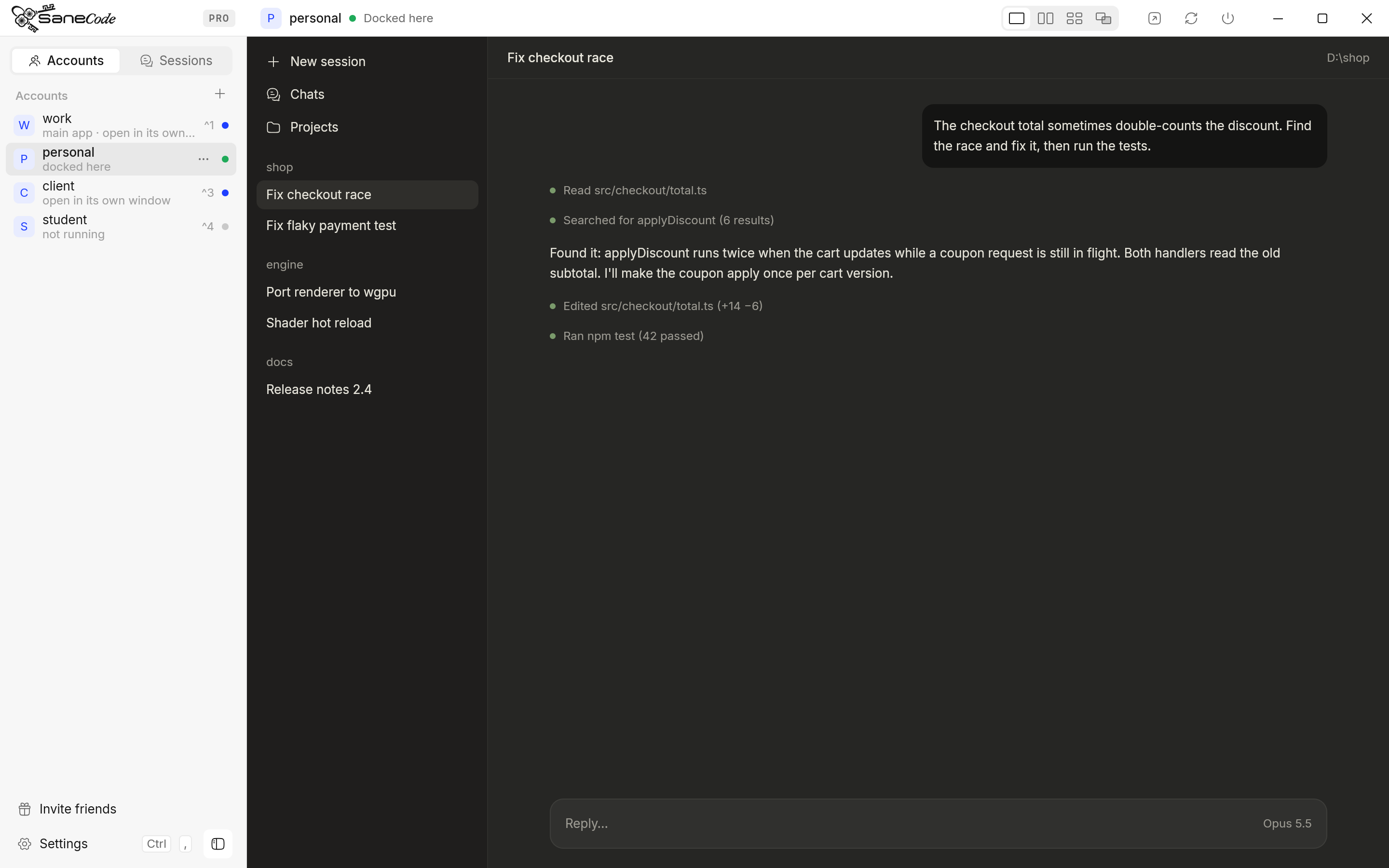
- It lets you move a Claude Code session to another account. Session Relay continues the conversation in the account you pick, with its full history and project folder. It’s free.
- It never touches your login. No token copying, no proxy, no API or Agent SDK. Each account is used exactly as Anthropic’s own app uses it.
Free for 2 accounts; Pro is $29 once for unlimited accounts (sanecode.co). Not affiliated with Anthropic.
How did we research this?
We read Anthropic’s own pages first: the  Claude Help Center,
the Claude Code docs and the
legal and compliance page. Then we went
through the open GitHub issues, about 35 posts on X, Reddit threads, Hacker News and around 50
GitHub tools, in November 2026. Every quote links to where it was said. The Claude desktop details
(the
claude-desktop.exe launcher, --user-data-dir, the Claude-Data folder) are the same
mechanism SaneCode is built on, so we checked them against a current Claude
desktop (version 5.11492) on Windows. We make SaneCode, so we’ve kept its section separate and
compared it in the same table as everything else.
FAQ
How do I use multiple Claude Code accounts on one computer?
Give each account its own config folder: CLAUDE_CONFIG_DIR=~/.claude-work claude for one,
plain claude for the other (Method 1).
For the desktop app’s Code tab, run one Claude desktop per account; the options are compared in
Claude multi-account managers for Windows.
Can I use two Claude accounts in Claude Code at the same time?
Yes. Start each terminal with a different CLAUDE_CONFIG_DIR. Both stay signed in and each uses
its own account’s limits.
Does CLAUDE_CONFIG_DIR work on Windows?
Yes. Set it in PowerShell ($env:CLAUDE_CONFIG_DIR = "$HOME\.claude-work") before running
claude, or use the function above. In a settings file, write the absolute path
(env vars).
Is there a claude auth switch command like gh auth switch?
Not yet. It’s requested in #30031 (102
reactions) and #109077.
Does CLIProxyAPI work with the Claude desktop app?
No. The desktop app talks to Anthropic directly; there’s no setting to point it at a proxy.
Is it against the terms to have two Claude Max accounts?
Owning several accounts isn’t banned; an Anthropic Claude Code team member said “It’s not against
terms of service to have multiple MAX accounts”
( PiunikaWeb).
Sharing an account, reselling access, and third-party tools that store or relay your login are
the problems (legal page).
Why does switching accounts use so many tokens?
The new account has no prompt cache for your conversation, so the next message is read in full.
Switch at a natural break, or start the new account with a short summary
(Reddit discussion).
The bottom line
For terminal Claude Code, CLAUDE_CONFIG_DIR is the clean, documented answer: one folder per
account, one alias per folder, done. CLIProxyAPI is powerful if you run many subscriptions across
machines, but it lives in a grey zone of Anthropic’s terms and does nothing for the desktop app.
If your Claude Code lives in the desktop app, SaneCode keeps every account
signed in and lets your sessions move with you.
Related: How to switch between Claude accounts without logging out · Hit your usage limit? Continue in another account
SaneCode runs the official Claude desktop once per account. Free for 2 accounts.
 Claude multi-account managers for Windows compared (2026)Every way to run several Claude Desktop accounts on one Windows PC, compared: SaneCode, Claude Desktop Manager, Claude Sessions Pro, Multi Instance for Claude Desktop and free GitHub scripts. What each one does, what it costs, and whether running several Claude accounts is allowed.How to use a personal and a work Claude account on one computer (2026)Keep your personal and work Claude accounts apart without logging out: the same-email switcher, browser profiles, a second Claude desktop, CLAUDE_CONFIG_DIR and SaneCode, compared. Plus what Anthropic says about training, connectors and moving accounts.
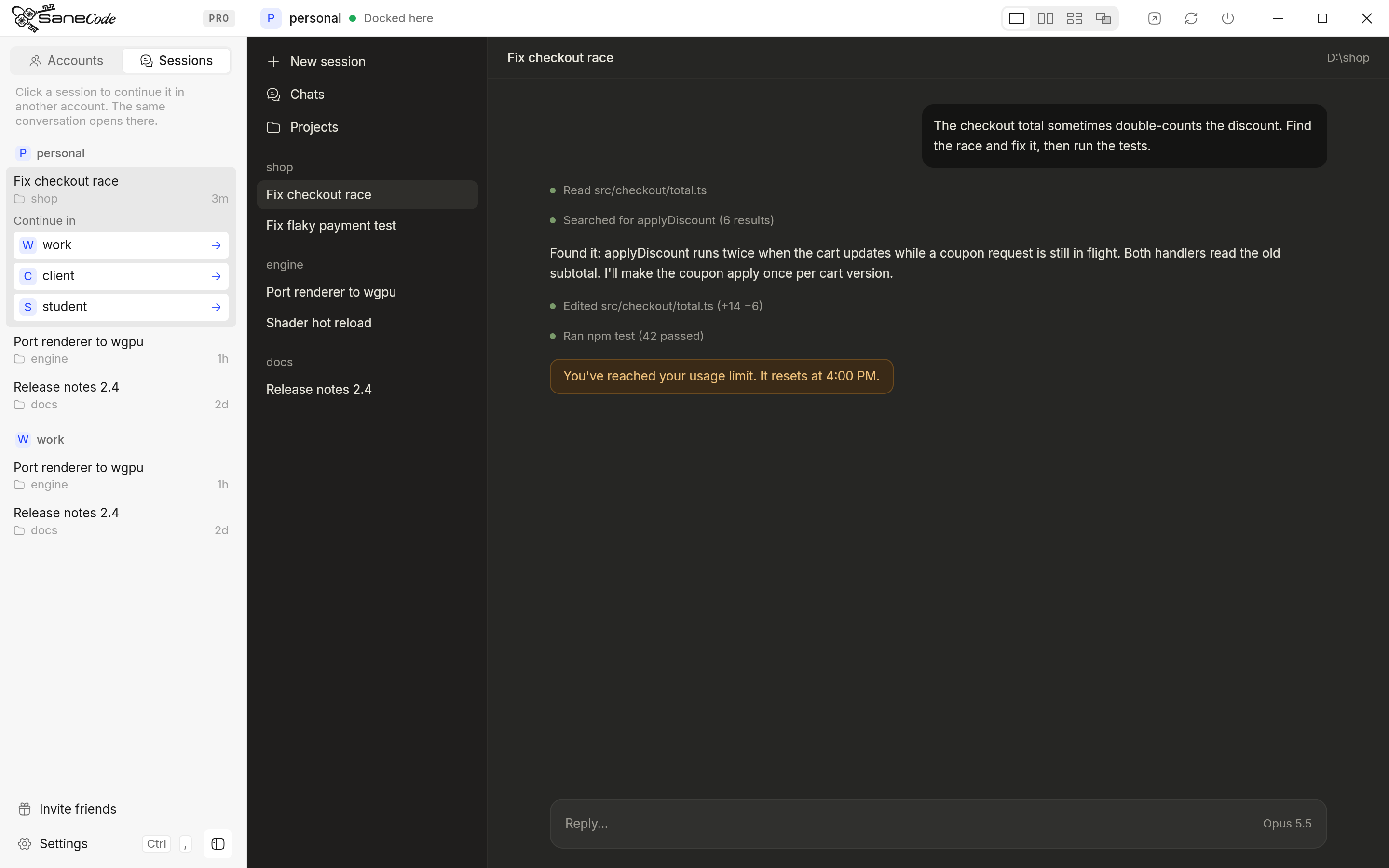 Hit your Claude usage limit? How to continue the same conversation in another accountWhen Claude says you've reached your usage limit mid-task, you can wait, or carry the same Claude Code conversation into your other account with full context. Step-by-step for the CLI (claude --resume), the desktop Code tab, auto-switchers, and what's allowed.