
On this page
- Key takeaways
- Why can’t you switch accounts in Claude?
- Method 1: Put the second account in a browser profile
- Method 2: Run a second Claude desktop with PowerShell (--user-data-dir)
- Method 3: Claude Code in the terminal: one config folder per account
- Method 4: CLIProxyAPI: pool your accounts behind a local proxy
- Method 5: Ready-made account switchers on GitHub
- Which way to run several Claude accounts is best? (Comparison)
- The SaneCode multi-account switcher
- Is it allowed to have two Claude accounts?
- How did we research this?
- FAQ
- The bottom line
By  @inxanity06, founder of SaneCode · Updated
How to switch between Claude accounts without logging out
Short answer: Claude desktop signs in one account at a time, so switching means logging out.
To keep two or more Claude accounts signed in, put the second one in a browser profile, start a
second Claude desktop with its own data folder (--user-data-dir), give Claude Code one
CLAUDE_CONFIG_DIR per account, or use SaneCode, which runs every account’s official Claude
desktop at the same time in one window.
You have a work Claude and a personal Claude. Or two Max plans because one isn’t enough. Every time you change accounts, the Claude desktop app makes you log out, wait for a sign-in email, click the link, and watch your sidebar go blank. Then you do it all again an hour later.
You’re not missing a button. The Claude desktop app has no account switcher for accounts on
different email addresses. Thousands of people have asked for one: the
 GitHub request for multiple accounts in Claude Desktop
has 1,398 reactions and 245 comments, and it’s still open. One post on X sums it up:
“i want to use the claude desktop app but how do you guys manage multiple accounts? it’s such a pain to log out and lose your sidebar etc. am i missing something?” (
This guide covers every way people get around it today, from zero-setup to power-user. Each method has steps, the catch, and links to the people who use it. A comparison table at the end shows which one fits you.
Key takeaways
- Claude desktop signs in one account at a time. Anthropic’s own answer for accounts on
different emails is “log out, then log in with the other email address”
(
 Claude Help Center).
- Fastest fix with nothing to install: keep the second account in a separate browser profile on claude.ai.
- Two Claude desktop apps at once: start a second copy of Claude with its own data folder
(
--user-data-dir). The PowerShell steps are below. - Claude Code in the terminal: give each account its own config folder with
CLAUDE_CONFIG_DIR. Anthropic documents this. - CLIProxyAPI pools several accounts behind one local endpoint for Claude Code. It does nothing for the desktop app, and Anthropic’s terms are strict about proxies.
- SaneCode runs every account’s official Claude desktop at the same time in one window, so you switch with a click and never log out.
Why can’t you switch accounts in Claude?
Claude desktop keeps one sign-in per data folder, and the app uses one data folder. So one app means one account.
Anthropic’s Help Center has a section titled “I have multiple accounts – how can I switch between
them?”. It covers only one case: an individual account and a Team or Enterprise account on the
same email address. Then you click your initials and pick the account. For everyone else it says:
“If your accounts are on different email addresses, log out, then log in with the other email
address” (source).
Logging out costs more than a minute. Claude has no passwords, so each switch means an email link
or a Google sign-in. Claude Code sessions in the desktop app’s Code tab are listed per account, so
the sidebar looks empty after a switch
(@vinlim: “Switching accounts in the desktop app
emptied my Claude Code sidebar every time”). Theo, who builds T3 Code, put it bluntly:
“Warning to Claude Code account switchers: multi-account on the desktop app is NOT VIABLE. You have to hard log out and you will lose all your sessions.” (
The mobile apps are ahead here. Users reported an Add account option on iPhone and Android in
September 2026 ( agentsroom.dev,
@dmfenton: “Praise be, Claude mobile app has an
account switcher!”). The desktop app hasn’t followed yet.
Method 1: Put the second account in a browser profile
Best for: one account you use in the app and a second one you only chat with.
claude.ai keeps its sign-in in the browser profile, so each profile is a separate session.
- In Chrome or Edge, click your profile picture next to the address bar and choose Add profile. (Firefox: a second profile, or a container per account with Multi-Account Containers. Safari: Settings → Profiles.)
- Name it “Claude Work” and open it.
- Go to
 claude.ai and sign in with the second account.
- Keep your main account in the desktop app or in your usual profile.
That’s it. Both stay signed in. This is what most people on
 r/ClaudeAI
do: “Most people just use separate browsers/profiles (e.g., Chrome profiles) or one in the app and
one in the browser to avoid constant logouts.”
The catch: the browser account doesn’t get the desktop app. No Code tab with local folders, no
Cowork, no desktop extensions. One enterprise user on the GitHub issue called it “a clunky
workaround” (#18435).
Method 2: Run a second Claude desktop with PowerShell (--user-data-dir)
Best for: two full Claude desktop apps, both signed in, open at the same time.
This is the trick behind most of the GitHub tools. People share it on X all the time:
“since it’s Electron, I just asked Claude to set it up: a second instance with its own –user-data-dir, both accounts running side by side. Works, but native multi-account would be way better — some features (e.g. Chrome pairing) are off in the 2nd profile.” (
How does it work?
Claude desktop is built on Electron, which accepts a --user-data-dir switch. A data folder holds
one account’s sign-in, settings and local state. Electron allows one running copy per data
folder, so a copy started with a different folder runs alongside the first instead of just
focusing its window. A developer who built a switcher explains it well on
Reddit:
“Electron’s single instance lock is per user data directory, which is why two instances pointed at
different folders actually run side by side.”
On Windows, the current Claude desktop (from claude.com or the Microsoft Store, the same packaged
app) installs a small launcher called claude-desktop.exe in
%LOCALAPPDATA%\Microsoft\WindowsApps. It passes your arguments to Claude, so you don’t need to dig
into the protected WindowsApps program folder, whose path changes with every update.
Step 1: Check the launcher is there
Open PowerShell (Start → type “PowerShell”) and run:
$claude = "$env:LOCALAPPDATA\Microsoft\WindowsApps\claude-desktop.exe"
Test-Path $claude
True means you’re set. False usually means an old Claude build. Install the current one from
 claude.com/download and try again.
Step 2: Make a data folder for the second account
$work = "$env:LOCALAPPDATA\Claude-Data\acct-work"
New-Item -ItemType Directory -Force -Path $work | Out-Null
Why this folder? Claude desktop is a packaged app. Windows quietly redirects its writes elsewhere
in AppData into the app’s private storage, and Claude-Data is the folder the package exempts. A
folder here stays where you can see it. (Other locations work too. Windows just moves the data to
%LOCALAPPDATA%\Packages\Claude_…\LocalCache, as
pdmoura’s guide notes.)
Use one folder per extra account: acct-work, acct-client, acct-max2. Leave your main account
where it is.
Step 3: Start the second Claude
Start-Process $claude -ArgumentList "--user-data-dir=`"$work`""A fresh, signed-out Claude opens next to your normal one.
Step 4: Sign in, the right way
This is where most people get stuck. When you sign in with Google or click the link in the
sign-in email, the browser sends you back to Claude through a claude:// link. Windows hands that
link to your first Claude, not the new one, so the new window waits forever.
Two ways around it:
- Use the email code. Click Continue with email, enter the address, and type the code
from the email into the new window. Don’t click the link. Tip from
pdmoura on GitHub: “Google sign-in and the
email link both come back through the
claude://callback, which Windows hands to the main instance, so the new window never finishes signing in.” - Hand the link over yourself (for Google or company SSO). On the browser page with the Open
Claude button, press F12, open Console, and click Open Claude. Copy the
claude://…link from the line that starts with Launched external handler. Then run:
Start-Process $claude -ArgumentList "--user-data-dir=`"$work`" `"claude://PASTE-THE-LINK-HERE`""The second copy receives the link and finishes signing in. You do this once; the account stays signed in from then on.
Step 5: Make a desktop shortcut
You don’t want to open PowerShell every morning. This creates a small launcher script and a Claude (Work) shortcut on your desktop:
$launcher = "$env:LOCALAPPDATA\Claude-Data\Claude-Work.ps1"
Set-Content -Path $launcher -Value "Start-Process `"$claude`" -ArgumentList '--user-data-dir=`"$work`"'"

$shell = New-Object -ComObject WScript.Shell
$lnk = $shell.CreateShortcut("$([Environment]::GetFolderPath('Desktop'))\Claude (Work).lnk")
$lnk.TargetPath = "$env:WINDIR\System32\WindowsPowerShell\v1.0\powershell.exe"
$lnk.Arguments  = "-NoProfile -WindowStyle Hidden -ExecutionPolicy Bypass -File `"$launcher`""
$lnk.Save()
Double-click Claude (Work) and the work account opens. Your normal Claude shortcut keeps opening your main account. Repeat steps 2–5 with another folder name for a third account.
On a Mac?
Same idea, different command. From
a Reddit answer:
open -n -a "Claude" --args --user-data-dir="$HOME/Library/Application Support/Claude-Work"What to watch out for
- Claude in Chrome. The browser extension pairs with one account. Users report it doesn’t work
well in the second copy (@matautu,
 Hacker News: “The only problem I’ve noticed is
with Claude in Chrome”). Anthropic’s docs confirm the extension must be signed in to the same
account and organization as Claude Code, or you get “Browser extension is not connected”
(
 Claude in Chrome docs).
- Code sessions don’t follow you. Claude Code conversations are saved once in
%USERPROFILE%\.claude\projects, but each account keeps its own list of them. A session you started on personal won’t show in the work copy’s sidebar. - Never open one folder twice. One data folder, one running copy.
- Each copy is a full app. It uses as much memory as another Claude window
(pdmoura’s limitations list).
- Closing isn’t quitting. Claude keeps running in the tray. Quit it from there before you reopen it from the shortcut.
- Two windows that look the same. Both show the same orange icon on the taskbar, so you have to look inside to see which account is which.
If you’d rather not paste commands, these free GitHub projects do the same thing for you:
PriyanshuGeTRekT/Claude-Code-Desktop-Switcher,
vodongha/claude-desktop-clone,
sypnose-cloud/claude-desktop-multi,
pdmoura/claude-desktop-side-by-side (colored
taskbar icons) and thomasog/multi-claude.
Method 3: Claude Code in the terminal: one config folder per account
Best for: developers who live in the Claude Code CLI.
This one is official. Anthropic’s docs have a section called
Log in with multiple accounts: “give each account
its own configuration directory” and set CLAUDE_CONFIG_DIR when you start claude. Each folder
gets its own login, settings and history.
In PowerShell, add a function per account to your profile (notepad $PROFILE):
function claude-work { $env:CLAUDE_CONFIG_DIR = "$HOME\.claude-work"; claude @args; Remove-Item Env:CLAUDE_CONFIG_DIR }On macOS or Linux it’s one alias: alias claude-work='CLAUDE_CONFIG_DIR=~/.claude-work claude'.
Run claude-work, sign in with the work account, and plain claude keeps your personal one.
The catch: it’s for the terminal. A recent GitHub issue reports that the desktop Code tab and
the VS Code extension don’t reliably respect it
(#109077). Skills, plugins and MCP servers
have to be set up once per folder (in the desktop app, every account shares them: see
plugins, skills and MCP). The full walkthrough, including how to carry a conversation
from one account to the other, is in our
Claude Code multiple accounts guide.
Method 4: CLIProxyAPI: pool your accounts behind a local proxy
Best for: heavy Claude Code users with several subscriptions who want one endpoint.
CLIProxyAPI (58.8k stars on GitHub, MIT) is a local
server. You sign in each Claude account once with cli-proxy-api --claude-login, and it spreads
requests across them (“Claude Code multi-account load balancing”, round-robin by default). Then you
point Claude Code at it with ANTHROPIC_BASE_URL=http://127.0.0.1:8317.
It has fans with big followings. Theo:
“If you have multiple accounts, don’t put them all in T3 Code. CLIProxy is trivial to set up. I’ve loved it so much that I forked it … So easy to share my 7 Claude subs and 3 Codex subs across 12 computers” (
The catches, honestly:
- It doesn’t touch the Claude desktop app. It only works for tools where you can change the
API address. One user: “it burned through all my accounts 5h limit in 5m and did nothing on Claude
Desktop” (@GrubyiP).
- Read Anthropic’s terms first. The Claude Code legal page says developers “may not collect,
store, or intermediate Claude.ai credentials or session tokens”, and that plan limits “assume
ordinary, individual usage” (legal and compliance).
A proxy that stores your logins and rotates them is hard to square with that wording. Anthropic
“may” enforce “without prior notice”.
Setup, config and the safer alternatives are in the Claude Code guide.
Method 5: Ready-made account switchers on GitHub
Dozens of free tools exist. They fall into two camps:
| Camp | How | Examples |
|---|---|---|
| Swap and restart | Saves each account’s login, swaps it in, restarts Claude. One account at a time. | SnlperStripes/claude-account-switcher (Windows, tray, usage ring), jspanji/Swivel (Mac), chussum/mobius (Mac), nyxon-tech/claude-switcher |
| One copy per account | Method 2 with a nicer face. Every account in its own window. | PriyanshuGeTRekT/Claude-Code-Desktop-Switcher, thomasog/multi-claude, jackson-cmd/claude-multi-desktop (Mac) |
| Claude Code CLI | Swap the CLI login, often automatically at the limit | realiti4/claude-swap (4.8k stars), inulute/cux, uwuclxdy/clauth |
Paid apps do the same with more polish; we compare SaneCode, Claude Desktop Manager, Claude Sessions Pro and others in Claude multi-account managers for Windows.
Before installing one, check whether it copies your sign-in. A commenter on the GitHub issue warned
that the lack of a native switcher is “creating a security liability for the community”, because
people hand their logins to third-party tools
(#18435).
Which way to run several Claude accounts is best? (Comparison)
| Log out / log in | Browser profiles | 2nd Claude via PowerShell | CLAUDE_CONFIG_DIR |
CLIProxyAPI | Swap-and-restart switchers | SaneCode | |
|---|---|---|---|---|---|---|---|
| Switch without logging out | ❌ | ✅ | ✅ | ✅ | ✅ | ✅ (restarts Claude) | ✅ |
| Several accounts open at once | ❌ | ✅ | ✅ | ✅ (terminals) | Pooled, not visible | ❌ | ✅ |
| Full Claude desktop app (Code tab, Cowork) | ✅ | ❌ web only | ✅ | ❌ CLI only | ❌ CLI only | ✅ | ✅ |
| All accounts in one window | — | ❌ | ❌ separate windows | ❌ | — | — | ✅ |
| Continue a conversation in another account | ❌ | ❌ | By hand | claude --resume by path |
Automatic, in the proxy | Some tools | ✅ Session Relay |
| Claude in Chrome for every account | One account | One Chrome profile each | Reported broken in 2nd copy | — | — | Re-sign the extension | ✅ (Pro) |
| Never copies or proxies your login | ✅ | ✅ | ✅ | ✅ | ❌ stores tokens | ❌ most swap logins | ✅ |
| No terminal needed | ✅ | ✅ | ❌ | ❌ | ❌ | ✅ | ✅ |
| Setup time | none | 2 min | 15–30 min | 5 min | 30+ min | 5 min | ~2 min |
Pick by situation:
- Only chat with the second account → browser profile.
- Comfortable with PowerShell, two accounts, fine with two windows → Method 2.
- Terminal-only Claude Code →
CLAUDE_CONFIG_DIR. - Several accounts, every day, in the desktop app, without juggling windows → SaneCode.
The SaneCode multi-account switcher
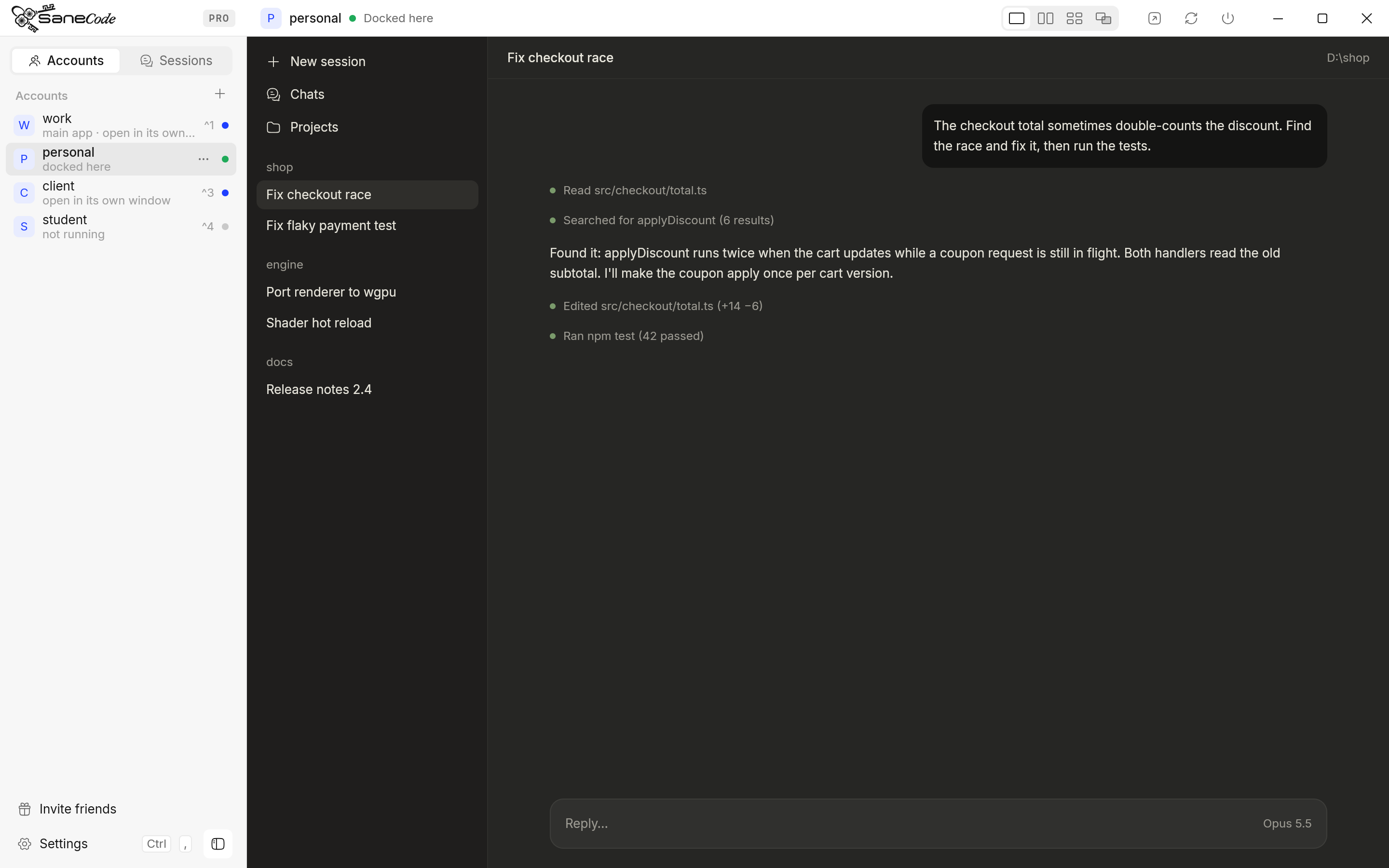
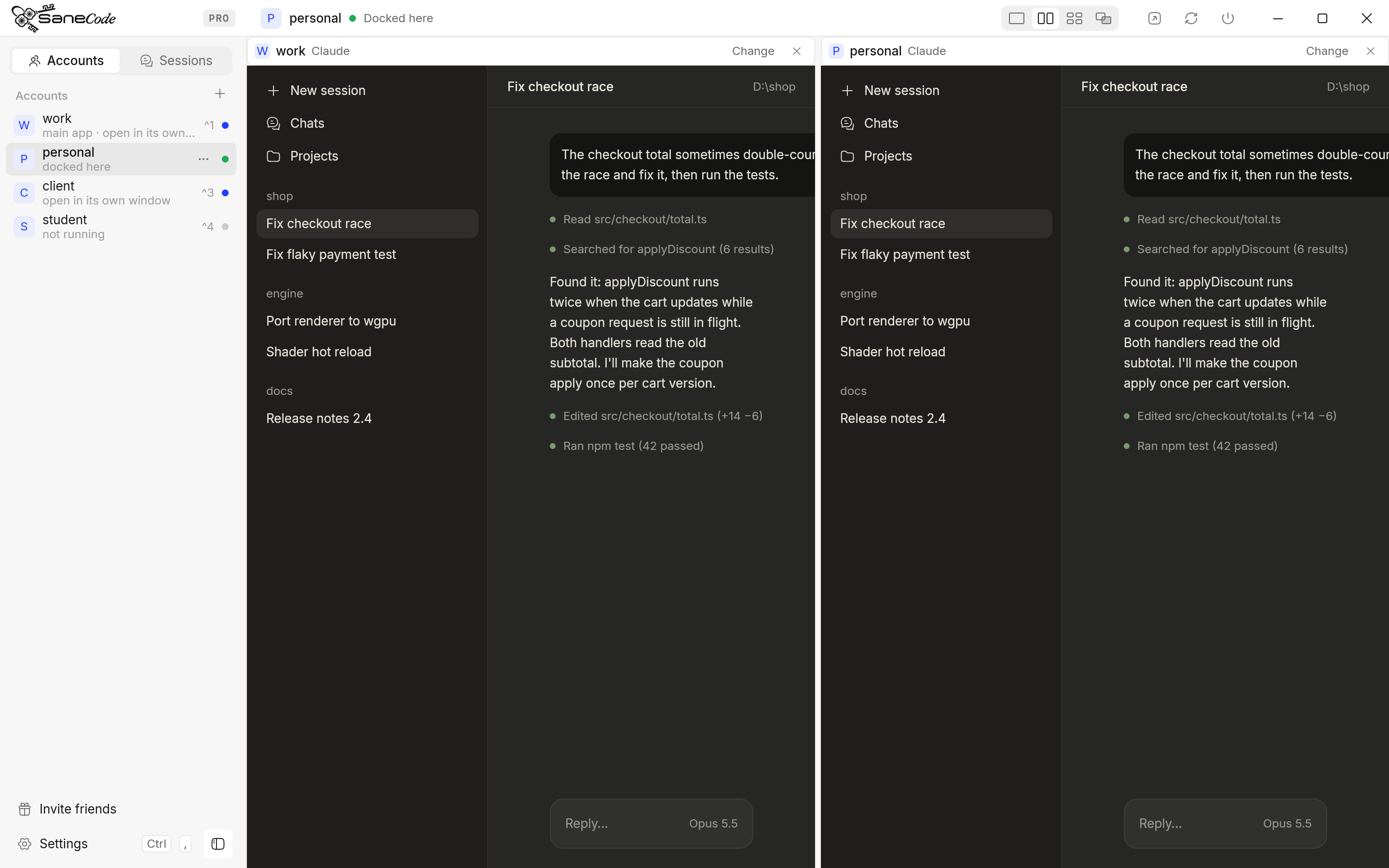
SaneCode is a desktop app built for exactly this problem. It runs the official Claude desktop app once per account, all at the same time, and docks their windows into one window with a sidebar. Nothing is signed out, closed or swapped when you switch; you just see another account.
- The SaneCode multi-account switcher lets you switch between Claude accounts without logging out. Click an account in the sidebar or press Ctrl+1…9 (switching). The others keep running.
- It lets you run two Claude desktop accounts at the same time, side by side. Split shows two, Grid shows four, Canvas any number (side by side).
- It lets you keep work and personal Claude accounts signed in, each with its own connectors, settings and chats. A client’s org stays with that client.
- It lets you continue a Claude conversation in another account when one hits its usage limit. Session Relay moves the Code-tab conversation, with its history and project folder, to the account you pick (how it works).
- It lets you use Claude in Chrome with every account from one Chrome profile, without signing the extension out and in (shared browser, Pro).
- It walks you through sign-in with a built-in guide, including the case where the browser sends the sign-in to your other Claude.
Why it’s different from the switchers above: SaneCode never copies, swaps or proxies your login. Each account signs in once through Anthropic’s own flow, in its own official Claude. Nothing goes through the API or the Agent SDK, so each account’s plan is used exactly as it would be on its own.
Cost: free for 2 accounts, including switching, Split and Grid, and Session Relay. Pro is $29 once for unlimited accounts, the Canvas layout and Claude in Chrome for every account (pricing). Setup takes about two minutes: install, press + next to Accounts, sign in once.
SaneCode is not affiliated with Anthropic. Claude is a trademark of Anthropic, PBC.
Is it allowed to have two Claude accounts?
Having more than one account isn’t forbidden. The Consumer Terms don’t mention “multiple accounts”
at all (Orpheus’s reading), and
an Anthropic Claude Code team member said in February 2026 that “It’s not against terms of service
to have multiple MAX accounts” (reported by
 PiunikaWeb).
Anthropic’s Help Center allows up to three accounts verified with one phone number
(
 via Shuriken).
What is clearly not allowed:
- Sharing an account or its login with someone else (Consumer Terms).
- Reselling or proxying access, “including services that route requests through consumer subscriptions” (Usage Policy, quoted by Orpheus).
- Using another account to get around a ban.
- Third-party apps that collect, store or relay your Claude.ai credentials
(Claude Code legal page).
So: your own accounts, your own plans, signed in through Anthropic’s own flow, is the safe zone.
How did we research this?
We read Anthropic’s own pages first: the Claude Help Center,
the Claude Code docs and the
legal and compliance page. Then we went
through the open GitHub issues, about 35 posts on X, Reddit threads, Hacker News and around 50
GitHub tools, in November 2026. Every quote links to where it was said. The Claude desktop details
(the claude-desktop.exe launcher, --user-data-dir, the Claude-Data folder) are the same
mechanism SaneCode is built on, so we checked them against a current Claude
desktop (version 5.11492) on Windows. We make SaneCode, so we’ve kept its section separate and
compared it in the same table as everything else.
FAQ
Can you have two Claude accounts on one computer?
Yes. Use a browser profile for the second one, a second Claude desktop with its own data folder (Method 2), or SaneCode. The Claude desktop app on its own signs in one account at a time.
How do I switch Claude accounts in the desktop app?
Click your initials, then Log out, then sign in with the other email. The account menu only
switches between a personal and a Team or Enterprise account on the same email
(Help Center).
Can I run two Claude desktop apps at the same time?
Yes, if each one uses its own data folder. Start the second with --user-data-dir (Method 2) or
let a tool start them for you.
Will I lose my chats when I switch accounts?
No. Chats live on Anthropic’s servers per account and come back when you sign in again. Claude Code sessions in the Code tab stay on your disk, but the sidebar only lists the signed-in account’s sessions, so they look gone until you switch back.
Does Claude have an account switcher on mobile?
Users report an Add account option (up to three) in the iPhone and Android apps since
September 2026. Anthropic hasn’t documented it yet
(agentsroom.dev).
Why does Claude in Chrome say “Browser extension is not connected”?
The extension is signed in to a different account or organization than Claude Code. Log out in the
extension and sign in to the one /status shows
(Claude in Chrome docs). Switching accounts in the desktop
app doesn’t update the extension (#107853).
Does using two accounts use more of my plan?
No. Each account’s usage counts against that account’s plan. Tools that route through the Agent
SDK can be metered differently; T3 Code measured its 5-hour limit draining about 1.7× faster before
a fix (T3 Code issue).
The bottom line
Claude desktop still makes you log out to change accounts. For a quick fix, put the second
account in a browser profile. For two real desktop apps, launch a second copy with
--user-data-dir from PowerShell. For the terminal, use CLAUDE_CONFIG_DIR. And if you switch
accounts every day and want every account signed in, in one window, with your conversations able
to move between them, try SaneCode free.
SaneCode runs the official Claude desktop once per account. Free for 2 accounts.
 Claude Code with multiple accounts: CLAUDE_CONFIG_DIR, CLIProxyAPI and switchers explainedHow to use two or more Claude accounts in Claude Code without /logout: one config folder per account with CLAUDE_CONFIG_DIR (Anthropic's documented way), PowerShell and bash setups, CLIProxyAPI for pooling, rotators like cswap, and what Anthropic's terms say.Claude multi-account managers for Windows compared (2026)Every way to run several Claude Desktop accounts on one Windows PC, compared: SaneCode, Claude Desktop Manager, Claude Sessions Pro, Multi Instance for Claude Desktop and free GitHub scripts. What each one does, what it costs, and whether running several Claude accounts is allowed.How to use a personal and a work Claude account on one computer (2026)Keep your personal and work Claude accounts apart without logging out: the same-email switcher, browser profiles, a second Claude desktop, CLAUDE_CONFIG_DIR and SaneCode, compared. Plus what Anthropic says about training, connectors and moving accounts.